# palmER - Full Content for AI Systems
> This file aggregates the full markdown bodies of palmER's most important pages
> for AI ingestion in a single fetch. Companion to https://www.palm-er.com/llms.txt
> (which is the link index) and https://www.palm-er.com/pricing.md (machine-readable
> pricing).
---
## /palmer - palmER AI Suite Marketing Page
URL: https://www.palm-er.com/palmer
### Less Documenting. More Doctoring.
palmER AI Suite is the premier AI-powered charting platform built for emergency medicine and urgent care. It was created by board-certified emergency physicians who lived the same documentation burden faced by clinicians every shift. The platform reduces charting time by up to 80% via ambient scribing, AI-generated HPI and Physical Exam notes, and an MDM Assistant that produces defensible, complete medical decision making documentation in seconds.
### Headline outcomes
- Reclaim your time: cut documentation time by up to 80%. Users report 2+ hours saved per shift, totaling 20+ hours per month.
- Bulletproof medicolegal protection: documentation that articulates your expertise and defends your practice. Every differential, every decision, every time.
- Enhanced clinical precision: AI-powered decision support as a cognitive safety net during high-stakes moments.
- Improved reimbursement: increase justified E/M levels by 15-20% by accurately documenting the true complexity of care.
- Leave on time: finish charts in seconds, not hours.
### How it fits the ED workflow
- See your patient. palmER's Ambient Scribe captures the encounter and writes your HPI and Physical Exam automatically before you're back at the computer.
- Switch between patients instantly. Stop and restart scribing as your shift demands without losing context. Add exam findings or corrections after scribing.
- Ambient Scribe also picks up the results, plans, consults, reassessments, and disposition you discuss during the encounter and adds them to your MDM: they go in when you generate it, and new details from later sessions update an existing MDM automatically. Edit them anytime in the MDM section.
- For MDM, paste your full chart into the MDM Assistant. palmER analyzes everything and generates a complete Medical Decision Making note in seconds: clinically appropriate differential diagnoses, risk stratification, justification for orders and consultations, shared decision-making documentation, and support for appropriate E/M billing levels.
- Review, edit if needed, and copy to your EMR. palmER works alongside any EMR with a copy/paste workflow, no integration or IT setup required.
### Pricing snapshot
- Free Trial: 30 days. Full access to every feature. No credit card required to start. No automatic billing; trial expires on its own.
- Clinician: $199 / month. The subscription follows the individual clinician, not a facility. All features included.
- Resident / Trainee: $49 / month for approved students and residents. Submit the verification form at https://www.palm-er.com/site/residents and receive approval before the trainee rate is available. The same features are included through the approved training end date.
- Group discounts: not currently offered. Real-time AI compute scales linearly with each user.
### Stats summary
- MDM generation in seconds
- 1M+ notes generated
- 80% less charting time
- 2+ hours saved per shift
---
## /palmer/about - Built by Emergency Physicians, for Emergency Medicine
URL: https://www.palm-er.com/palmer/about
palmER AI Suite was created by board-certified emergency physicians who faced the same documentation burden every clinician faces every shift. We built what we needed ourselves and now share it with our colleagues. The platform exists because the physicians behind palmER lived in the ED with the same problem: documentation was stealing time, energy, and passion from clinical care. Every feature in palmER AI Suite traces back to a real shift, a real patient encounter, and a real clinical workflow problem.
palmER's MDM Assistant is the unique selling proposition: MDM is where clinical care, billing, and liability intersect - the hardest and most time-consuming section to write, and the one that matters most when a case reaches litigation. palmER AI's MDM Assistant generates comprehensive, structured MDM documentation that reflects the full scope and complexity of clinical reasoning. It integrates differential diagnosis analysis, evidence-based recommendations, and risk assessment in a single interface. The output covers clinical best practices, billing requirements, and medicolegal protection in one document, with accuracy, structure, and depth of reasoning unmatched by generic AI scribes.
---
## /palmer/pricing - Pricing in Prose
URL: https://www.palm-er.com/palmer/pricing
Machine-readable companion: https://www.palm-er.com/pricing.md
The Documentation Burden Ends Now. The standard clinician rate for palmER AI Suite is $199 per month, about $1-2 per hour worked, to reclaim your time, create defensible documentation, and leave on time every shift. Approved students and residents qualify for the $49/month trainee rate after submitting the verification form at https://www.palm-er.com/site/residents and receiving approval. A 30-day free trial requires no credit card to start; the trial expires automatically with no auto-billing.
Every Pro plan includes: Ambient Scribing, MDM Assistant, HPI and Physical Exam Assistants, Patient Management, Chart View, Clinical Decision Support, the integrated palmEM AI knowledge base, Chart CheckER chart review, ConsultER consult-script generation, E/M level capture support, and priority support.
The subscription follows the individual clinician, not a facility or EMR. Change sites, pick up extra shifts, switch healthcare systems; palmER comes with you. Group discounts are not offered today because real-time AI compute scales linearly per user, though that may change as adoption grows.
palmEM AI subscribers receive access to the palmEM AI knowledge base on the web within palmER AI Suite at no additional cost; the full palmER AI Suite still requires a separate paid subscription at the clinician rate or, for approved students and residents, the trainee rate.
---
## /site/security - Security & HIPAA Compliance
URL: https://www.palm-er.com/site/security
palmER has maintained a zero-incident security record since 2011. The platform is HIPAA-compliant by design: security and privacy are foundational, not afterthoughts. All data on palmER follows HIPAA-compliant storage and processing protocols, combining established compliance standards with modern cloud security.
### Data handling
- No data is used for AI training.
- No data is sold to anyone.
- No audio is ever stored on our servers or sent to any third party. Speech is transcribed and immediately discarded, and no one, including palmER staff, can listen to any encounter.
- Patient data is automatically deleted within 24 hours.
- AI features route data only to providers with zero-retention agreements.
- Because nothing is retained, there is no shadow record of the encounter: no stored audio, transcript, or AI draft that could be discovered in litigation. The only lasting record is the note the clinician signs in the EMR. (Employer-purchased and EMR-embedded scribes may retain audio, transcripts, drafts, and clinician inputs, and retained data is discoverable.)
### Technical safeguards
- Enterprise-grade encryption: AES-256 at rest, TLS 1.2+ in transit.
- Strict access controls based on assigned roles and permissions.
- Comprehensive audit logging: who accessed what data, when, and from where.
- Network segmentation isolates backend systems from internet-facing applications.
- Regular vulnerability assessments and penetration testing.
- All data stored and processed in US-based, HIPAA-compliant data centers with active redundancy.
### Administrative safeguards
- All palmER staff undergo background checks and complete annual security awareness training on HIPAA, privacy, and information protection.
- Regular HIPAA risk assessments.
- All vendors who may process patient information are required to be HIPAA compliant and sign Business Associate Agreements with palmER.
- palmER acts as your Business Associate under HIPAA. The BAA is automatically incorporated into the platform terms of service, no additional steps required from users.
### Data sovereignty
All data is stored and processed exclusively within HIPAA-compliant US data centers. palmER does not sell, share, or use your data for any purpose other than providing services to you.
---
## /palmer/features/chart-view - Chart View
URL: https://www.palm-er.com/palmer/features/chart-view
> Chart View brings HPI, Physical Exam, and MDM into a single editable workspace, with versioning, snippets, and chart review.
### One chart. Every section. Side-by-side.
Chart View brings the whole encounter into a single editable canvas, HPI, Physical Exam, and MDM, so you can refine the chart the way you'd write it, not the way the form forces you to.
### What it does
- **Edit in place, see the whole story**: Open any section and revise without losing context. Move between HPI, Exam, and MDM without bouncing between tabs or pages.
- **Versioned, not destroyed**: Version history per section, kept side by side. Compare a tighter MDM against the verbose one. Use the version that works best.
- **Snippets and preferences carry across**: Your saved phrasings, formatting, and section ordering are applied consistently. The chart looks like your chart, not a template.
- **More than documentation**: Use Colab from the right sidebar for clinical questions, case-specific help, and custom patient documents.
### How it fits in palmER AI Suite
Chart View keeps HPI, Physical Exam, and MDM together, with optional automatic Discharge Instructions in Patient Mode. Review, edit, and copy the notes into your EMR.
### Related pages
- [MDM Assistant](https://www.palm-er.com/palmer/assistants/mdm): Paste a chart, get a complete defensible MDM with differential, risk stratification, and E/M-aware structure. The flagship of palmER AI Suite.
- [Chart CheckER](https://www.palm-er.com/palmer/assistants/chart-checker): Chart CheckER reviews your chart before sign-off and flags documentation gaps, billing opportunities, and medico-legal vulnerabilities.
- [Patient Mode](https://www.palm-er.com/palmer/workflows/patient-mode): Patient Mode drafts the HPI and Exam on a multi-patient shift board and adds the results, plans, and consults you discuss to your MDM. No audio stored.
---
## /palmer/features/clinical-insights - Clinical Insights
URL: https://www.palm-er.com/palmer/features/clinical-insights
> Clinical Insights surfaces Most Serious and Most Likely differential panels with per-case reasoning alongside the MDM, on demand.
### The thinking next to the chart, not buried in it.
Clinical Insights is the sidebar that runs alongside the MDM: Most Serious, Most Likely, and per-case reasoning that augments your thinking instead of replacing it.
### What it does
- **Most Serious panel**: The conditions you can't miss. A second pair of eyes on the differential, critical causes first.
- **Most Likely panel**: The conditions the presentation actually fits. Helps anchor the MDM in clinical probability, not just possibility.
- **Per-case reasoning**: Short, specific reasoning for the patient in front of you, why this differential, why that disposition, why this level of care. The kind of language that holds up on chart review.
- **Loads on demand**: Insights stay out of your way until you open them. No pop-ups, no interrupting the visit, no clinical decision support fatigue.
### How it fits in palmER AI Suite
Clinical Insights is what makes the MDM feel like a partner instead of a generator. The MDM Assistant writes the documentation; Clinical Insights tells you why, and gives you a place to challenge the AI's reasoning before you sign.
It lives alongside Chart View so you can adjust the MDM with the panels open.
> Designed by emergency physicians who got tired of being told their chart was 'missing something' after the patient was discharged.
### Related pages
- [MDM Assistant](https://www.palm-er.com/palmer/assistants/mdm): Paste a chart, get a complete defensible MDM with differential, risk stratification, and E/M-aware structure. The flagship of palmER AI Suite.
- [Chart View](https://www.palm-er.com/palmer/features/chart-view): Chart View brings HPI, Physical Exam, and MDM into a single editable workspace, with versioning, snippets, and chart review.
- [Chart CheckER](https://www.palm-er.com/palmer/assistants/chart-checker): Chart CheckER reviews your chart before sign-off and flags documentation gaps, billing opportunities, and medico-legal vulnerabilities.
---
## /palmer/features/colab - palmER Colab
URL: https://www.palm-er.com/palmer/features/colab
> Colab knows the case, automatically suggests notes you may need, and helps you write critical care, procedure, and sepsis reassessment notes.
### Ask a follow-up. It already knows the patient.
palmER Colab is the side panel you can talk to mid-chart. It inherits the patient context and the conversation context automatically, so you don't have to re-explain anything to ask a real question.
### What it does
- **Patient context, already loaded**: Colab knows what HPI you generated, what differential is on the board, what was ordered. You ask the next question; you don’t restate the case.
- **Critical care, procedures, and sepsis**: Colab identifies critical care, procedures, and sepsis that may need a separate note. It shows you why, with the option to draft the note or dismiss the reminder if it does not apply.
- **Sepsis documentation at a glance**: See what's documented and what needs attention for blood cultures, lactate, antibiotics, fluids, repeat lactate, vasopressors, and reassessment. Click any checklist item to change its color as you review the case.
- **Complete notes in one click**: Draft a critical care note, procedure note, or sepsis reassessment note in one click. Check the critical care time before writing, then review the draft, edit it, or ask Colab to make changes.
- **Follow up on the differential**: Ask why something is in the Most Serious panel. Ask what would shift you toward the next workup. Ask what to do with the equivocal troponin.
- **Backed by palmEM AI**: Answers draw on the trusted palmEM AI clinical reference, built for emergency medicine.
### How it fits in palmER AI Suite
Colab is the version of an AI assistant that doesn't waste your time. The MDM Assistant builds the documentation. Clinical Insights frames the thinking. palmER Colab is where you talk to it like a colleague when something specific comes up.
Colab also helps you finish critical care, procedure, and sepsis documentation. Review the sepsis checklist to see what's documented and what needs attention.
### Related pages
- [MDM Assistant](https://www.palm-er.com/palmer/assistants/mdm): Paste a chart, get a complete defensible MDM with differential, risk stratification, and E/M-aware structure. The flagship of palmER AI Suite.
- [palmEM AI](https://www.palm-er.com/palmer/assistants/palmem-ai): palmEM AI is the trusted emergency-medicine clinical reference, integrated into the palmER AI Suite workspace and available in your pocket.
- [Clinical Insights](https://www.palm-er.com/palmer/features/clinical-insights): Clinical Insights surfaces Most Serious and Most Likely differential panels with per-case reasoning alongside the MDM, on demand.
---
## /palmer/assistants/hpi - HPI Assistant
URL: https://www.palm-er.com/palmer/assistants/hpi
> Generate a complete, complaint-specific HPI with the right positives and negatives, from a one-line summary or an ambient encounter.
### A complete history from a one-line summary.
Enter a brief summary, chief complaint, the four or five things you actually heard, and the HPI Assistant returns a full, complaint-specific history with relevant positives and negatives, written the way you'd write it.
### What it does
- **Complaint-specific framing**: The HPI knows that abdominal pain is not the same as chest pain. The pertinent positives and negatives match the chief complaint, not a generic template.
- **Positives and negatives that hold up**: The ones a reviewer would expect, and the ones that change the differential. Not a wall of irrelevant ROS bullets.
- **Snippet- and preference-aware**: Section ordering, voice, and recurring phrasings follow your saved preferences. The chart sounds like you.
- **Works in both modes**: Type the summary in Assistant Mode, or let Patient Mode auto-generate the HPI from the captured encounter. Same output, same quality.
### How it fits in palmER AI Suite
The HPI Assistant is one of three core documentation tools, HPI, Physical Exam, MDM, that together write the chart. Each can be used on its own; together they replace the slow, painful parts of charting.
### Related pages
- [Physical Exam Assistant](https://www.palm-er.com/palmer/assistants/physical-exam): Generate focused, defensible physical exam documentation, typed in Assistant Mode or auto-generated in Patient Mode.
- [MDM Assistant](https://www.palm-er.com/palmer/assistants/mdm): Paste a chart, get a complete defensible MDM with differential, risk stratification, and E/M-aware structure. The flagship of palmER AI Suite.
- [Patient Mode](https://www.palm-er.com/palmer/workflows/patient-mode): Patient Mode drafts the HPI and Exam on a multi-patient shift board and adds the results, plans, and consults you discuss to your MDM. No audio stored.
---
## /palmer/assistants/physical-exam - Physical Exam Assistant
URL: https://www.palm-er.com/palmer/assistants/physical-exam
> Generate focused, defensible physical exam documentation, typed in Assistant Mode or auto-generated in Patient Mode.
### A focused exam, charted the way you actually examined the patient.
Generate concise, defensible physical exam documentation, typed in Assistant Mode, or auto-generated alongside the HPI in Patient Mode.
### What it does
- **Focused to the complaint**: The exam follows the chief complaint. No twelve-system stock exam where one or two systems were the point.
- **Defensible without being padded**: Documents what you would expect to be documented for the level of care and the differential, without inventing findings.
- **Patient Mode-compatible**: If you used Patient Mode, the exam is auto-generated from the encounter. You review and refine; you don't type from scratch.
- **Works with your snippets**: Your phrasings, for normal cardiac, normal respiratory, neuro by system, carry through.
### How it fits in palmER AI Suite
Pairs with the HPI Assistant and the MDM Assistant to write the full chart. In Patient Mode, the exam writes itself from the encounter; in Assistant Mode, you generate it on demand from a brief input.
### Related pages
- [HPI Assistant](https://www.palm-er.com/palmer/assistants/hpi): Generate a complete, complaint-specific HPI with the right positives and negatives, from a one-line summary or an ambient encounter.
- [MDM Assistant](https://www.palm-er.com/palmer/assistants/mdm): Paste a chart, get a complete defensible MDM with differential, risk stratification, and E/M-aware structure. The flagship of palmER AI Suite.
- [Patient Mode](https://www.palm-er.com/palmer/workflows/patient-mode): Patient Mode drafts the HPI and Exam on a multi-patient shift board and adds the results, plans, and consults you discuss to your MDM. No audio stored.
---
## /palmer/assistants/mdm - MDM Assistant
URL: https://www.palm-er.com/palmer/assistants/mdm
> Paste a chart, get a complete defensible MDM with differential, risk stratification, and E/M-aware structure. The flagship of palmER AI Suite.
### The MDM, written the way you would defend it.
Paste a full chart into the MDM Assistant. You get a complete MDM with a real differential, risk stratification, justification for orders and consults, shared decision-making language, and an E/M level you can defend.
### What it does
- **Differential that respects probability and risk**: Most Serious and Most Likely panels generate alongside the MDM. The differential is anchored, not exhaustive.
- **Reasoning, not boilerplate**: Why you ordered what you ordered. Why you consulted who you consulted. Why this disposition. Specific to the patient.
- **E/M-aware structure**: Documents the elements the level of care requires, without the padding that gets a chart kicked back.
- **Versioned**: Version history per MDM, kept side by side so you can compare tones, lengths, or approaches before you sign.
### How it fits in palmER AI Suite
The MDM Assistant is the flagship of the suite, the reason palmER exists. The HPI and Exam Assistants get the easy parts out of the way; the MDM Assistant does the hard part well.
It works best in Chart View, with Clinical Insights open alongside it.
### Related pages
- [Clinical Insights](https://www.palm-er.com/palmer/features/clinical-insights): Clinical Insights surfaces Most Serious and Most Likely differential panels with per-case reasoning alongside the MDM, on demand.
- [Chart View](https://www.palm-er.com/palmer/features/chart-view): Chart View brings HPI, Physical Exam, and MDM into a single editable workspace, with versioning, snippets, and chart review.
- [Chart CheckER](https://www.palm-er.com/palmer/assistants/chart-checker): Chart CheckER reviews your chart before sign-off and flags documentation gaps, billing opportunities, and medico-legal vulnerabilities.
---
## /palmer/assistants/consulter - ConsultER
URL: https://www.palm-er.com/palmer/assistants/consulter
> ConsultER generates structured specialty consult scripts that make the call land well and keep documentation aligned.
### A consult script that makes the call land well.
ConsultER generates a structured consult script for the specialty you’re calling, the framing, the question, the relevant data, so the consultant hears what they need and the documentation lines up with the call.
### What it does
- **Specialty-shaped framing**: Cardiology wants the EKG and trop. Surgery wants the abdominal exam, imaging, and the question. ConsultER shapes the script to who you’re calling.
- **The question, not just the case**: Pulls the actual reason for the consult to the top. The consultant gets oriented in the first sentence.
- **Documentation alignment**: Generates language for the chart that reflects the call, including SDM and disposition implications.
- **Editable, of course**: Generated as a starting point. Edit before reading, or use it as a checklist while you call.
### How it fits in palmER AI Suite
ConsultER lives in the workflow alongside Patient Mode and Assistant Mode. The MDM may say you're consulting cardiology; ConsultER is the tool you use ten seconds later to actually make the call go smoothly.
### Related pages
- [MDM Assistant](https://www.palm-er.com/palmer/assistants/mdm): Paste a chart, get a complete defensible MDM with differential, risk stratification, and E/M-aware structure. The flagship of palmER AI Suite.
- [Patient Mode](https://www.palm-er.com/palmer/workflows/patient-mode): Patient Mode drafts the HPI and Exam on a multi-patient shift board and adds the results, plans, and consults you discuss to your MDM. No audio stored.
- [Chart View](https://www.palm-er.com/palmer/features/chart-view): Chart View brings HPI, Physical Exam, and MDM into a single editable workspace, with versioning, snippets, and chart review.
---
## /palmer/assistants/chart-checker - Chart CheckER
URL: https://www.palm-er.com/palmer/assistants/chart-checker
> Chart CheckER reviews your chart before sign-off and flags documentation gaps, billing opportunities, and medico-legal vulnerabilities.
### A second pass before you sign.
Chart CheckER reviews the whole chart before sign-off and flags what a reviewer, a coder, or a defense attorney would notice, documentation gaps, billing opportunities, medico-legal vulnerabilities.
### What it does
- **Documentation gaps**: Missing pertinent elements for the level of care. Missing decision points the MDM implies but didn’t document.
- **Billing opportunities**: Where the documentation is leaving level on the table, the SDM you discussed but didn’t write down, the risk you stratified without language, the time you spent that wasn’t captured.
- **Medico-legal vulnerabilities**: Where the chart looks defensible in the moment but reads thin on review. The differential you considered but didn’t document considering. The disposition logic that needs a sentence.
- **Specific, not generic**: Flags reference the chart in front of you, not a checklist of every box you could conceivably check.
### How it fits in palmER AI Suite
Chart CheckER reads Chart View, the whole chart, not fragments, and produces a focused list. Address it, sign, move on.
### Related pages
- [Chart View](https://www.palm-er.com/palmer/features/chart-view): Chart View brings HPI, Physical Exam, and MDM into a single editable workspace, with versioning, snippets, and chart review.
- [Patient Mode](https://www.palm-er.com/palmer/workflows/patient-mode): Patient Mode drafts the HPI and Exam on a multi-patient shift board and adds the results, plans, and consults you discuss to your MDM. No audio stored.
- [MDM Assistant](https://www.palm-er.com/palmer/assistants/mdm): Paste a chart, get a complete defensible MDM with differential, risk stratification, and E/M-aware structure. The flagship of palmER AI Suite.
---
## /palmer/assistants/discharger - DischargER
URL: https://www.palm-er.com/palmer/assistants/discharger
> DischargER writes patient-specific discharge instructions, work notes, and school notes, with optional automatic discharge writing in Patient Mode.
### Any document your patient needs.
DischargER writes clear, personalized discharge instructions, work notes, school notes, and other patient documents from your chart. In Patient Mode, it can also write discharge instructions automatically from your MDM. Each document is tailored to its reader.
### What it does
- **Discharge and aftercare instructions**: Patient-specific home care guidance, follow-up recommendations, and return precautions, built from the chart rather than a template. In Patient Mode, optional automatic writing drafts instructions from your discharge or transfer MDM and updates them as the plan changes.
- **Work, school, and daycare notes**: Return-to-work, return-to-play, activity restriction, excuse, and clearance letters, written for the employer, school, or coach who will read them.
- **Minimum necessary, by default**: Third-party notes leave out diagnoses, test results, and medications unless you specifically ask for them to be included.
- **Results, explained**: Important results, pending tests, and incidental findings that need follow-up are explained in language the patient can act on.
### How it fits in palmER AI Suite
DischargER sits under Tools in Assistant Mode and in the right sidebar in Patient Mode, where the chart is already loaded. Ask for the document, tap a suggestion, then refine it in place without starting over.
### Related pages
- [Patient Mode](https://www.palm-er.com/palmer/workflows/patient-mode): Patient Mode drafts the HPI and Exam on a multi-patient shift board and adds the results, plans, and consults you discuss to your MDM. No audio stored.
- [MDM Assistant](https://www.palm-er.com/palmer/assistants/mdm): Paste a chart, get a complete defensible MDM with differential, risk stratification, and E/M-aware structure. The flagship of palmER AI Suite.
- [palmER Colab](https://www.palm-er.com/palmer/features/colab): Colab knows the case, automatically suggests notes you may need, and helps you write critical care, procedure, and sepsis reassessment notes.
---
## /palmer/assistants/palmem-ai - palmEM AI
URL: https://www.palm-er.com/palmer/assistants/palmem-ai
> palmEM AI is the trusted emergency-medicine clinical reference, integrated into the palmER AI Suite workspace and available in your pocket.
### The bedside reference, inside the suite.
palmEM AI is the trusted emergency-medicine clinical reference, built into the workspace. You don't tab over to a search engine to confirm a dose or look up an algorithm, you ask, and the answer comes back specific to the case.
### What it does
- **EM-specific, not general medical**: Built on a decade of curated emergency-medicine content. Answers reflect ED practice, not generic textbook abstractions.
- **Context-aware queries**: When you ask from palmER Colab, the patient context comes with you. The answer is shaped by the case, not generic.
- **Grounded in the reference**: Answers come from the comprehensive palmEM AI knowledge base.
- **Mobile, too**: The palmEM AI mobile app keeps the same reference in your pocket between shifts.
### How it fits in palmER AI Suite
palmEM AI is the reference layer underneath the assistants. The MDM Assistant uses it when it reasons; Clinical Insights pulls from it when it explains; palmER Colab draws on it when you ask.
### Related pages
- [palmER Colab](https://www.palm-er.com/palmer/features/colab): Colab knows the case, automatically suggests notes you may need, and helps you write critical care, procedure, and sepsis reassessment notes.
- [Clinical Insights](https://www.palm-er.com/palmer/features/clinical-insights): Clinical Insights surfaces Most Serious and Most Likely differential panels with per-case reasoning alongside the MDM, on demand.
- [MDM Assistant](https://www.palm-er.com/palmer/assistants/mdm): Paste a chart, get a complete defensible MDM with differential, risk stratification, and E/M-aware structure. The flagship of palmER AI Suite.
---
## /palmer/workflows/assistant-mode - Assistant Mode
URL: https://www.palm-er.com/palmer/workflows/assistant-mode
> Assistant Mode is palmER’s chart-paste and direct-prompt workflow, paste a chart, get a defensible MDM; type a summary, get a full HPI.
### Paste, prompt, and chart, at your pace.
Assistant Mode is the workflow for clinicians who chart between rooms instead of in them. Paste a chart fragment, give a one-line summary, and the assistants do most of the work.
### What it does
- **Chart-paste MDM**: Paste a full chart into the MDM Assistant and get a complete, defensible MDM back. The fastest path to a finished note.
- **Direct-prompt HPI and Exam**: Type a brief summary, get a complete HPI and a focused Exam. Edit in place.
- **No audio capture**: No ambient capture runs in this mode. Use it in settings where ambient listening isn’t a fit, or simply when you prefer typing.
- **Same Chart View, same Chart CheckER**: Everything downstream, Chart View, Clinical Insights, Chart CheckER, works identically to Patient Mode.
### How it fits in palmER AI Suite
Assistant Mode is the workflow many clinicians start in. It’s a low-friction way to feel what the assistants do without changing how you see patients.
### Related pages
- [Patient Mode](https://www.palm-er.com/palmer/workflows/patient-mode): Patient Mode drafts the HPI and Exam on a multi-patient shift board and adds the results, plans, and consults you discuss to your MDM. No audio stored.
- [MDM Assistant](https://www.palm-er.com/palmer/assistants/mdm): Paste a chart, get a complete defensible MDM with differential, risk stratification, and E/M-aware structure. The flagship of palmER AI Suite.
- [Chart View](https://www.palm-er.com/palmer/features/chart-view): Chart View brings HPI, Physical Exam, and MDM into a single editable workspace, with versioning, snippets, and chart review.
---
## /palmer/workflows/patient-mode - Patient Mode
URL: https://www.palm-er.com/palmer/workflows/patient-mode
> Patient Mode drafts the HPI and Exam on a multi-patient shift board and adds the results, plans, and consults you discuss to your MDM. No audio stored.
### See the patient. The chart writes itself.
Patient Mode runs ambient capture during the encounter and auto-generates the HPI and Physical Exam, on a shift board that keeps every patient, active and completed, pending and signed, visible so you never lose where you are on each chart. It also picks up the results, plans, consults, reassessments, and disposition you discuss and adds them to your MDM. Edit them anytime in the MDM section.
### What it does
- **Ambient capture, then discarded**: Audio is transcribed and immediately discarded. No human-listenable audio is ever stored on our servers, so there is no recording to be discovered later; the only lasting record is the note you sign.
- **HPI and Exam, on their own**: The HPI Assistant generates the history from the encounter. The Physical Exam Assistant fills in what you examined. Both are complaint-specific.
- **Active and completed in one view**: Every patient on your board with their chief complaint, room, age, and documentation status, at a glance.
- **Section-level completion**: HPI, Exam, and MDM badges per patient. You see exactly what’s left to finish before sign-off.
- **Switch without losing context**: Pause, resume, move to another patient when you’re pulled away. The state of the chart you left is exactly where you left it.
- **Pairs with the MDM Assistant**: Once HPI and Exam are in, palmER uses your chart and details from your Ambient Scribe sessions to write the MDM. Optional automatic discharge instructions carry the plan through to the patient's next steps.
### How it fits in palmER AI Suite
Patient Mode is the workflow built for the way ED encounters actually happen, interrupted, parallel, unscheduled. Use it on the patients where it helps; use Assistant Mode on the rest.
The board is the spine of the shift. It’s the reason interruption-driven charting works in this suite: you aren’t trying to remember where you were on each chart, the board is. And it’s the same board regardless of which mode you used to chart any given patient.
### Related pages
- [Assistant Mode](https://www.palm-er.com/palmer/workflows/assistant-mode): Assistant Mode is palmER’s chart-paste and direct-prompt workflow, paste a chart, get a defensible MDM; type a summary, get a full HPI.
- [Chart CheckER](https://www.palm-er.com/palmer/assistants/chart-checker): Chart CheckER reviews your chart before sign-off and flags documentation gaps, billing opportunities, and medico-legal vulnerabilities.
- [HPI Assistant](https://www.palm-er.com/palmer/assistants/hpi): Generate a complete, complaint-specific HPI with the right positives and negatives, from a one-line summary or an ambient encounter.
---
## /palmer/faq - Frequently Asked Questions (full)
URL: https://www.palm-er.com/palmer/faq
21 questions. Each answer is the full plain-text version emitted in FAQPage JSON-LD on the page.
### 1. What is palmER AI Suite?
palmER AI Suite is a HIPAA-compliant, AI-powered documentation and ambient scribing platform built from the ground up for emergency medicine. With Ambient Scribing, palmER has your HPI and Exam done before you're even back at the computer. Or simply enter a few brief words and get back comprehensive documentation. Paste your full chart for a complete, defensible MDM. Less typing, fewer clicks, and time back for patients, your family, and your life.
### 2. Can I use palmER for urgent care?
Yes. palmER helps you document emergency and urgent care visits. Ambient Scribe writes your HPI and Physical Exam and captures the results, plans, consults, reassessments, and disposition you discuss during the encounter. Paste your chart into the MDM Assistant, and palmER brings it all together in a structured MDM in seconds. Prepare patient instructions, work notes, and school notes in the same workspace, then copy the sections you want into your EMR.
### 3. Can palmER write discharge instructions automatically?
Yes. In Patient Mode, optional automatic writing drafts instructions from your discharge or transfer MDM and updates them as the plan changes. It is off by default. See the DischargER user guide for setup, editing, copying, and work or school notes.
### 4. What is ambient scribing and how does it work in the ED?
Ambient scribing means the AI listens during your patient encounter and generates documentation from the conversation. Most ambient scribes were designed for office visits in a peaceful clinic: scheduled appointments, one patient at a time. That doesn't work in the ED.
palmER's Ambient Scribe was built specifically for emergency medicine. See your patient, and palmER writes your HPI and Physical Exam automatically. It also picks up the results, plans, consults, reassessments, and disposition you discuss and adds them to your MDM. Edit them anytime in the MDM section. Switch between patients instantly. Stop and restart scribing as your shift demands without losing context. Add exam findings or corrections after scribing that weren't said aloud.
No audio is ever stored on our servers or sent to any third party. Speech data is processed and then immediately discarded.
### 5. Can I use palmER without ambient scribing?
Yes. Type or dictate brief notes into the HPI and Physical Exam Assistants, or paste your existing chart into the MDM Assistant. palmER drafts the documentation from the information you provide. Review, edit and copy the result into your EMR. Ambient scribing is optional.
### 6. How does the MDM Assistant work?
Paste your full chart into the MDM Assistant: HPI, past medical history, vitals, exam, labs, imaging, whatever you have. If you used Ambient Scribe, palmER also includes the results, plans, consults, reassessments, and disposition it captured during the encounter. palmER analyzes everything and generates a complete Medical Decision Making note in seconds. The output includes clinically appropriate differential diagnoses, risk stratification, justification for orders and consultations, shared decision-making documentation, and support for appropriate E/M billing levels. Review it, edit if needed, and copy to your EMR.
### 7. Is palmER HIPAA compliant? Is my data secure?
Privacy and security aren't afterthoughts. They're foundational. palmER is HIPAA-compliant by design. Your data is only used for one purpose: to respond to what you ask for. Nothing else.
- No data is used for AI training.
- No data is sold to anyone.
- No audio is ever stored on our servers or sent to any third party. No one, including us, can ever listen to any encounter.
- With automatic deletion of patient data within 24 hours, we can't hand over what doesn't exist.
We use enterprise-grade encryption (AES-256 at rest, TLS 1.2+ in transit), strict access controls, and comprehensive audit logging. We act as your Business Associate under HIPAA, and we maintain Business Associate Agreements with all subprocessors who may handle PHI. When you use AI features, data is routed only to providers with zero-retention agreements, meaning your data is processed to generate a response but never used for training.
For more details, review our Security & HIPAA page at https://www.palm-er.com/site/security.
### 8. Is what an AI scribe keeps discoverable?
If it exists, assume it can be requested. When an AI scribe is purchased by your employer or hospital, or comes embedded in your EMR, it may retain the audio of the encounter, the verbatim transcript, the AI's draft notes, and your typed inputs long after you sign, and retained data is discoverable in litigation. That shadow record can describe the encounter differently than your signed note does, and most clinicians have never seen the contract or hospital policy that decides how long it exists.
palmER keeps nothing to discover. Audio is never saved: it is transcribed and discarded, so no recording of the encounter ever exists. Transcripts, drafts, and chats auto-delete within 24 hours. Once you sign, the note in your EMR is the only lasting record, just as it was before AI.
Even if your hospital already provides a scribe, it is worth asking what it retains. We wrote up what the major tools keep and the questions to ask: https://www.palm-er.com/blog/what-does-your-ai-scribe-save
### 9. My hospital already provides AI. Why would I pay for palmER?
Hospital-provided AI, whether an ambient scribe or note writing built into the EMR, was bought for the system, not for you. It is typically tuned for scheduled clinic visits and generic notes, not for the multi-patient ED shift or the structured, defensible MDM that emergency medicine documentation hinges on. palmER is built for exactly that: a complete MDM with differential and risk stratification in seconds, plus ambient scribing designed for interrupted, multi-patient work.
There is also the question of what the hospital's tool keeps. Its retention is set by contract and hospital policy, and retained audio, transcripts, drafts, and inputs are discoverable in litigation. palmER retains nothing: audio is never saved, patient data auto-deletes within 24 hours, and the only lasting record is the note you sign.
And palmER is portable. Your account belongs to you, not your employer, so it goes wherever you practice: the main ED, the community site, the locums shift, your next job. It works alongside any EMR with no integration step, so changing hospitals never means losing your workflow.
### 10. What features are included in palmER AI Suite?
- Ambient Scribing: palmER listens during your encounter and writes your HPI and Physical Exam automatically. It also picks up the results, plans, consults, reassessments, and disposition you discuss and adds them to your MDM. Edit them anytime in the MDM section. No audio is ever stored on our servers or sent to any third party.
- MDM Assistant: Paste your full chart and get a complete, defensible MDM note in seconds.
- HPI and Physical Exam Assistants: Enter a brief summary and get comprehensive, complaint-specific notes with pertinent positives and negatives.
- Patient Management: Track patients, switch between encounters, and see documentation status at a glance.
- Chart View: Review HPI, Exam, and MDM on a single screen. Edit inline, refine with follow-up instructions, and copy to your EMR.
- palmEM AI Reference: Ask any emergency medicine question and get instant, evidence-based answers without leaving your workflow.
- Chart CheckER: Run your chart through a quality check before signing. Flags documentation gaps, billing opportunities, and medico-legal vulnerabilities.
- ConsultER: Generate structured consult scripts for specialist communication.
- palmER Colab: Ask clinical questions, generate discharge instructions, and get answers in a side panel that already knows your patient's case, without interrupting your charting.
### 11. How is this different from templates or dictation?
Templates give you the same generic text for every patient. Dictation transcribes what you say but doesn't do anything with it. You still have to organize, structure, and review everything yourself.
palmER is different. With Ambient Scribing, it listens to your encounter and writes your HPI and Exam for you. With the MDM Assistant, you paste in your full chart and get a defensible MDM that captures your clinical reasoning, differential diagnosis, and risk stratification. The AI understands the clinical context of each case and generates documentation specific to your patient's presentation.
The difference is that palmER does the thinking about documentation structure so you can focus on the clinical thinking.
### 12. Is palmER just another AI scribe?
Ambient scribing built for the ED, not adapted for it. Most ambient scribes were designed for clinic workflows. Scheduled appointments, peaceful office visits, one patient at a time. That falls apart in the emergency department. palmER was built from the ground up by practicing emergency physicians for the way the ED actually works.
palmER listens during your encounter and auto-generates your HPI and Physical Exam before you're even back at the computer. It also captures the results, plans, consults, reassessments, and disposition you discuss. Paste in your full chart, and palmER brings it together in a complete, defensible MDM that captures the full complexity of your clinical thinking. Switch between patients instantly. Stop and restart charting as your shift demands without losing context.
Less typing, fewer clicks, and documentation that reflects the care you're actually providing. No audio is ever stored on our servers or sent to any third party. Speech is transcribed and immediately discarded.
### 13. How quickly will I see results?
Right away. Your first note will take seconds instead of minutes. By the end of your first shift, you'll notice the difference in how much time you have left. Most users say they knew within one shift that palmER was going to change how they practice.
### 14. Will palmER work with my EMR?
palmER works alongside any EMR. Generate your documentation in palmER, then copy and paste into your EMR. It fits into your existing workflow without any integration or IT setup required.
### 15. I am a palmEM subscriber. Is palmER AI Suite included in my subscription?
As a palmEM subscriber, you have access to the palmEM AI knowledge base on the web within palmER AI Suite at no additional cost.
The full palmER AI Suite, including Ambient Scribing, MDM generation, and all documentation assistants, requires a separate subscription at $199/month. These are different products that serve different purposes: palmEM is a mobile clinical reference, palmER AI Suite is a documentation platform.
### 16. Who created palmER AI Suite?
palmER AI Suite was built by board-certified emergency physicians who faced the same documentation burden you do. We built what we needed ourselves, and now we are sharing it with our colleagues.
### 17. What if I'm skeptical about AI documentation tools?
That's fair. Most of our users were too. The best thing you can do is try it on a real chart during a real shift. The free trial gives you 30 days with full access, no credit card required. One shift is usually enough to see whether palmER fits your workflow.
### 18. How does the free trial work?
Sign up and get full access to every feature for 30 days.
- No credit card required to start
- No automatic billing. Your trial simply expires if you don't subscribe.
- Full access to all palmER AI Suite features for 30 days
After the trial, you can subscribe at $199/month to continue using all features.
### 19. Is palmER really worth it?
palmER saves most users 2+ hours per shift. That's 20+ hours a month. Over 10 days every year. palmER also helps you document the full level of care you're actually providing.
Is an hour of your time worth $2? That's what it comes down to. And the 30-day free trial costs you nothing to find out.
### 20. Do you offer any discounts?
Group discounts, not at this time. Our costs scale directly with each additional user because every note generated requires significant real-time AI compute. The $199/month pricing reflects the true cost of delivering clinical-grade AI documentation. Many groups are adopting palmER and we're listening to feedback as we grow; if group pricing becomes feasible, we'll announce it.
We do offer a trainee discount for students and residents: see https://www.palm-er.com/site/residents for details. We also offer an active duty military discount: contact us at https://www.palm-er.com/site/contact from your .mil email address.
One thing worth noting: your palmER subscription follows you. It's not tied to a facility or EMR. Change sites, pick up extra shifts, switch healthcare systems. palmER comes with you.
### 21. What if I don't like it after the trial?
No problem. Your trial expires on its own. You won't be billed automatically and you don't need to cancel anything. We only want you to subscribe if palmER makes a real difference in your workflow.
---
## /support/docs/palmer-ai-suite/introduction/overview - Welcome to palmER AI Suite
URL: https://www.palm-er.com/support/docs/palmer-ai-suite/introduction/overview
> Cut charting time up to 80% with AI-powered documentation and ambient scribing built for emergency medicine and urgent care. Defensible HPI, exam, and MDM.
You know the scenario: It's 4 AM, twenty charts to finish, and you're trying to document the subtle clinical reasoning behind why it was safe to discharge the weak and dizzy patient you saw six hours ago. The waiting room is still full, and you're fielding questions about stable patients that you simply don't have time to see.
palmER AI Suite was built from the ground up for the ED by practicing emergency physicians. We didn't adapt existing tools or reshape existing software. We started from scratch. It doesn't take long to see how existing documentation tools fall apart in the ED: more clicks, more templates, more wasting your time. palmER works with your workflow, not against it.
**What palmER does:**
- **Ambient Scribing** that captures your encounter at the bedside, on the iOS and Android app or in your browser, writes your HPI and Exam automatically, and adds the results, plans, consults, reassessments, and disposition you discuss to your MDM
- **MDM generation** that produces defensible, billing-optimized notes in seconds from your raw chart
- **[Automatic discharge instructions](/support/docs/palmer-ai-suite/features/discharger)** that follow your discharge or transfer MDM in Patient Mode, ready to review with the chart. Off by default; enable them in **Settings → DischargER**.
- **Clinical decision support** integrated directly into your documentation workflow
- **Keeps data private and secure** with auto-deletion of patient data within 24 hours. No audio is ever stored on our servers or sent to anyone else.
> **The Documentation Crisis**
>
> Emergency medicine has the highest burnout rate of any specialty. The number one cause? Documentation.
> - 2-3 hours per shift
> - 10 hours every week
> - **21 days every year**
>
> Time taken from patients, your family, and your life. It doesn't have to be this way anymore.
### What Changes With palmER
**You chart faster.**
Comprehensive documentation in seconds. Not hours. Not after your shift.
**Your notes are better.**
State of the art AI that captures your clinical reasoning and ensures your notes reflect the complexity of the care you're providing.
**Your charts hold up.**
Documentation that clearly demonstrates what you were thinking and why. The kind of notes you're proud to have anyone read.
### Core Features
#### MDM Assistant
palmER's flagship feature. Paste in your chart data and get a complete Medical Decision Making note in seconds.
**[MDM Assistant](/support/docs/palmer-ai-suite/features/mdm-assistant)**
Generate comprehensive medical decision-making documentation in seconds
- Paste your chart data, get a complete MDM note
- Automatically generates clinically appropriate differential diagnoses
- Demonstrates risk stratification and clinical reasoning
- Supports appropriate E/M billing levels
#### Ambient Scribing
See your patient. palmER captures the encounter and writes your HPI and Physical Exam automatically.
**[Ambient Scribing](/support/docs/palmer-ai-suite/features/ambient-scribing)**
Finally, ambient scribing built for the ED. Capture encounters and generate documentation automatically.
- Scribe at the bedside with the iOS and Android app, or in your browser
- See your patient, palmER transcribes and writes your HPI and Exam
- palmER picks up the results, plans, consults, reassessments, and disposition you discuss and adds them to your MDM
- Add supplemental context after scribing for exam findings and corrections
- Review, edit, and refine generated documentation in Chart View
- No audio is ever stored on our servers or sent to any third party. Speech is transcribed and immediately discarded.
#### HPI Assistant
Stop typing lengthy histories from scratch. With Ambient Scribing, your HPI generates automatically. Or enter a brief summary and palmER writes the rest.
**[HPI Assistant](/support/docs/palmer-ai-suite/features/hpi-assistant)**
Create detailed, complaint-specific histories from brief clinical input
- Turn 1-2 sentences into a complete HPI
- Includes appropriate pertinent positives and negatives
- Adapts to your documentation style
- Saves 5-10 minutes per chart
#### Physical Exam Assistant
Generate focused physical exam documentation tailored to the patient's presentation. Automatically with Ambient Scribing, or by a brief text input.
**[Physical Exam Assistant](/support/docs/palmer-ai-suite/features/physical-exam-assistant)**
Generate focused, complaint-appropriate physical exam documentation
- Creates chief complaint-specific exams
- Includes relevant systems and findings
- Maintains professional, consistent documentation
- Eliminates generic copy-paste templates
### Clinical Support Tools
**[palmEM AI Reference](/support/docs/palmer-ai-suite/features/palmem-ai-reference)**
Emergency medicine knowledge base integrated into your documentation workflow
- Ask any emergency medicine question, get instant evidence-based answers
- No more interrupting your workflow to search UpToDate
- Generate discharge instructions and patient education
- Access the same AI that powers the palmEM mobile app
**[ConsultER](/support/docs/palmer-ai-suite/features/consult-scripter)**
Structure and script specialist consultations
- Generates organized consult presentations
- Ensures you communicate clinical urgency effectively
- Includes strategies for handling pushback
- Makes difficult conversations easier
**[Chart CheckER](/support/docs/palmer-ai-suite/features/chart-analysis)**
Documentation quality review
- Identifies documentation gaps before you sign
- Highlights billing optimization opportunities
- Flags potential medico-legal vulnerabilities
- Ensures your charts are defensible
### Who Is palmER For?
**Emergency medicine clinicians.** Attendings, residents, NPs, PAs. palmER was built by ED physicians for the ED workflow. If you're in the emergency department, this is for you.
**Urgent care providers.** High patient turnover, limited time per chart, same need for defensible documentation. palmER has you covered.
**Acute care clinicians.** Complex decision-making, high volumes, and notes that reflect the full scope of care you're providing.
**Groups and health systems.** Consistent documentation quality across all providers, optimized billing capture, and less burnout-driven turnover.
### What Users Are Seeing
**2+ hours back per shift.** Up to 80% less time charting. That's time you spend however you want.
**Better billing capture.** Notes that consistently reflect the complexity of care you're providing and support appropriate E/M levels.
**Defensible charts.** Documentation that demonstrates your clinical reasoning, differential consideration, and risk stratification. Every patient, every shift.
**Reduced mental load.** palmER handles the charting. You focus on the medicine.
**Actually going home on time.** No more logging in at home to finish charts. When your shift ends, you're done.
### Getting Started
> **Try palmER AI Suite Free for 30 Days**
>
> No credit card required. Full access to all features. Cancel anytime.
>
> **New users:** [Start your free trial](https://platform.palm-er.com/signup)
>
> **Already have an account?** [Log in here](https://platform.palm-er.com)
### palmER AI Suite vs. palmEM AI
These are two different products. Here's how they fit together.
**palmER AI Suite** is your documentation platform, with two parts that share one account:
- A **web platform** for full charting, MDM generation, and editing at a workstation.
- A **mobile app** (iOS and Android) for ambient scribing at the bedside, where your HPI and Exam draft automatically.
**palmEM AI** is a separate **mobile reference app** (iOS and Android) for fast clinical guidance during care: protocols, medication dosing, and differential diagnoses.
They serve different jobs, and many clinicians use them together: palmEM for bedside reference, the palmER app to scribe the encounter, and the palmER web platform to finish the chart. The web platform also has the palmEM AI Reference feature built in.
---
## /support/docs/palmer-ai-suite/introduction/key-features-and-benefits - Key Features and Benefits
URL: https://www.palm-er.com/support/docs/palmer-ai-suite/introduction/key-features-and-benefits
> Emergency medicine AI documentation platform with Ambient Scribing, MDM generation, and clinical decision support. Faster charts, better notes, fewer clicks.
palmER AI Suite was built by emergency physicians from the ground up for the emergency department workflow. Every feature is shaped by the realities of working in the ED.
Most clinical documentation tools, including ambient scribes, were designed for clinic workflows. Scheduled appointments, peaceful office visits, one patient at a time. That's not emergency medicine. In the ED, you're juggling multiple patients, managing constant interruptions, and making high-stakes decisions under time pressure. palmER was built for that reality.
- **Multiple patients, one shift** — create patients, scribe encounters, and switch between charts instantly
- **Interruption-friendly** — stop and restart scribing as your shift demands, without losing context
- **ED-specific documentation** — generates notes that reflect emergency medicine language, structure, and clinical reasoning
- **Supplemental context** — add exam findings and details that weren't said aloud, because not everything happens in front of a computer's microphone in the ED
### AI-Powered Documentation Assistants
palmER AI Suite's core strength is its specialized AI assistants that understand emergency medicine workflows and generate professional documentation in seconds.
#### MDM Assistant: Complete MDM Notes in Seconds
The MDM (Medical Decision Making) Assistant is palmER's flagship feature.
**How it works:**
#### Copy and paste your chart data
Paste in your entire chart. HPI, past medical and surgical histories, vitals, exam, labs, imaging...whatever you've got so far. The more context you provide, the better the output.
#### Send it
The AI processes your input and creates a comprehensive MDM note.
#### Get a complete MDM note in seconds
Review and edit the output to match your clinical assessment.
**What it generates:**
- Clinically appropriate differential diagnoses (both "must rule out" and "most likely")
- Risk stratification discussion
- Justification for orders, consultations, and disposition
- Documentation of shared decision-making
- Support for appropriate E/M billing levels
> **Real User Feedback**
>
> "The time I spend on charting is barely noticeable now. I paste in a chart and the MDM is done. It captures clinical nuances I'd miss at 4 AM. The MDM alone is worth the subscription."
[Learn more about MDM Assistant](/support/docs/palmer-ai-suite/features/mdm-assistant)
### Ambient Scribing & Patient Management
#### Ambient Scribing
**How it works:**
- Tap **Start Ambient Scribe**, see your patient, tap stop
- Add optional supplemental context (exam findings, corrections)
- HPI and Physical Exam auto-generate in seconds
- Review, edit, and refine — then copy to your EMR
**Privacy built in:**
- **Audio is ephemeral.** It is transcribed and immediately discarded. No audio is ever stored on our servers or sent to anyone else.
- **Patient data auto-deletes within 24 hours.**
- **Your data is never used for AI training.** Your encounters stay private.
[Learn more about Ambient Scribing](/support/docs/palmer-ai-suite/features/ambient-scribing)
---
#### Patient Management: Your Digital Track Board
The patient panel keeps your shift organized. Add patients, track documentation progress, and switch between encounters instantly. Each patient card shows room number, demographics, chief complaint, and documentation status.
[Learn more about Patient Management](/support/docs/palmer-ai-suite/features/patient-management)
---
#### Chart View: All Documentation at a Glance
Review your documentation on a single screen. Refine any section with targeted instructions, edit inline, browse version history, and copy to your EMR. All without switching tabs.
[Learn more about Chart View](/support/docs/palmer-ai-suite/features/chart-view)
---
#### HPI Assistant: Turn Brief Input Into Complete Histories
Stop typing lengthy histories from scratch.
**How it works:**
With Ambient Scribing, your HPI generates automatically. Or, simply enter a brief summary like: `45M, chest pain x 2 hours, radiates to jaw, diaphoretic, no prior cardiac hx`
**What you get:**
A complete, professionally written HPI with:
- Proper narrative structure
- Complaint-specific pertinent positives and negatives
- Appropriate detail level
- Consistent style matching your preferences
Saves 5-10 minutes per chart while ensuring you don't miss important elements.
[Learn more about HPI Assistant](/support/docs/palmer-ai-suite/features/hpi-assistant)
---
#### Physical Exam Assistant: Chief Complaint-Specific Documentation
Generate focused physical exam documentation tailored to the patient's presentation. Automatically with Ambient Scribing, or by a brief text input.
**No more:**
- Generic "normal" templates
- Copy-paste documentation that looks suspicious
- Forgetting to document relevant systems
**Instead:**
- Complaint-appropriate system reviews
- Professional, varied language
- Consistent quality across all charts
- Focused on relevant findings
[Learn more about Physical Exam Assistant](/support/docs/palmer-ai-suite/features/physical-exam-assistant)
---
#### Chart CheckER: Chart Review for Gaps
Before you sign your chart, run it through Chart CheckER.
**What it analyzes:**
- Documentation completeness
- Billing optimization opportunities
- Medico-legal vulnerabilities
- Clinical clarity and defensibility
**What you get:**
- Specific suggestions for improvement
- Flags for missing critical elements
- Billing level verification
- Peace of mind before signing
Think of it like having a documentation expert review, analyze, and provide actionable feedback on every chart.
[Learn more about Chart CheckER](/support/docs/palmer-ai-suite/features/chart-analysis)
---
#### ConsultER: Structure Specialist Consultations
Calling a consultant at 2 AM about an incidental but possibly significant CT finding? ConsultER helps you organize your presentation.
**Generates:**
- Structured consult scripts
- Clear communication of clinical urgency
- Concise summary of workup to date
- Specific request with justification
- Strategies for handling pushback
Makes difficult conversations easier and more effective.
[Learn more about ConsultER](/support/docs/palmer-ai-suite/features/consult-scripter)
---
#### DischargER: Instructions That Follow Your MDM
In Patient Mode, DischargER can write patient-specific instructions automatically when your MDM identifies discharge or transfer. Home care, results, incidental findings, follow-up, and return precautions come from the encounter.
Automatic writing is **off by default**. Enable **Write discharge instructions automatically** in **Settings → DischargER**. The instructions appear below MDM in Chart View and in their own Chat View tab. Later MDM changes update the directions when needed; you can edit, refine, compare versions, and copy the instructions.
The separate **Work and school notes** setting, also off by default, adds a button to write a work, school, or daycare note. You can still request any patient document in the DischargER sidebar or Assistant Mode.
[Learn more about DischargER](/support/docs/palmer-ai-suite/features/discharger)
---
#### palmEM AI Reference: Instant Clinical Guidance
The same AI-powered emergency medicine knowledge base from the palmEM mobile app, integrated into your documentation workflow.
**Use it for:**
- Clinical questions during documentation
- Verifying treatment protocols
- Generating patient discharge instructions
- Creating work/school notes
- Quick reference without leaving your workflow
No more switching to UpToDate mid-chart. Ask your question, get your answer, keep documenting.
[Learn more about palmEM AI Reference](/support/docs/palmer-ai-suite/features/palmem-ai-reference)
### Platform Features That Save Even More Time
Beyond the core assistants, palmER AI Suite includes platform-level features designed to eliminate friction and save additional time during every shift.
#### palmER Colab: Your Contextual Sidebar Assistant
A slide-out chat panel available from any assistant page. Colab automatically sees what you're working on in the main chat window, so you do not have to re-explain the case. Ask about orders, workup, results, follow-up, discharge instructions, or anything else that comes up, all without interrupting your workflow. Colab also identifies critical care, procedures, and sepsis that may need a separate note. The sepsis checklist shows what's documented and what needs attention. Draft a critical care, procedure, or reassessment note in one click, then review and edit it before adding it to your chart.
[Learn more about palmER Colab](/support/docs/palmer-ai-suite/features/palmer-colab)
---
#### Snippets: One-Click Reusable Prompts
Save the phrases you type every shift — attestations, formatting templates, follow-up instructions — and insert them with a single click. First Prompt snippets help you start cases consistently, and Follow-Up snippets auto-send common refinements instantly.
[Learn more about Snippets](/support/docs/palmer-ai-suite/features/snippets)
---
#### Chat Editing and Branching: Refine Without Starting Over
Edit any message in your chat — yours or the AI's. Need to add a lab result? Edit your input and regenerate. Need to tweak the AI's wording? Edit the response directly. Every edit creates a version you can navigate between, so nothing is ever lost.
[Learn more about Chat Editing and Branching](/support/docs/palmer-ai-suite/features/chat-editing-and-branching)
### Real-World Benefits
These aren't marketing promises - they're real changes seen by palmER users:
#### Massive Time Savings
**2+ hours saved per shift** on documentation.
Think about what you could do with an extra 10 hours per week:
- Actually leave on time at the end of your shift
- Spend more time with anything other than your EMR
- Take a real lunch break
- Reduce take-home charting to zero
The time savings alone pays for the subscription many times over.
#### Improved Billing Accuracy
**Capture appropriate E/M levels** without gaming the system.
The MDM Assistant ensures your documentation accurately reflects the complexity of your medical decision-making. Many users find their charts consistently support higher E/M levels because the documentation now matches the level of care they're providing.
This isn't about upcoding. It's about getting credit for the work you're actually doing.
#### Enhanced Documentation Quality
**Professional, defensible notes** that demonstrate clinical reasoning.
Generic templates and copy-paste documentation don't show your thinking. palmER-generated notes clearly demonstrate:
- Comprehensive differential diagnosis consideration
- Risk stratification and medical necessity
- Clinical reasoning behind orders and consultations
- Shared decision-making documentation
If you ever face litigation or peer review, you'll be glad you used palmER.
#### Reduced Cognitive Load
**Let AI handle the tedious parts** so you can focus on doctoring.
You shouldn't have to remember to document every element of medical decision-making while also managing a critically ill patient. palmER handles the documentation structure and completeness. You verify nuance and accuracy.
#### Better Work-Life Balance
**Finish charting during your shift** instead of taking work home.
No more logging in from home to close charts. No more sacrificing family time to documentation. When your shift ends, you're actually done.
#### Consistent Documentation Quality
**Every chart meets professional standards** regardless of time pressure or fatigue.
Your 3 AM chart for patient #25 will be just as thorough and well-documented as your first chart of the shift. No more documentation quality fading as you get tired.
### Who Benefits Most?
**Individual clinicians** benefit from time savings, better documentation, and improved work-life balance.
**Group practices** benefit from consistent documentation quality across all providers and optimized billing capture.
**Healthcare systems** benefit from reduced clinician burnout, decreased medico-legal risk, and improved revenue integrity.
### Try It Free for 30 Days
> **Experience These Benefits Yourself**
>
> No credit card required. Full access to all features. Cancel anytime.
>
> **Start your free trial:** [platform.palm-er.com/signup](https://platform.palm-er.com/signup)
Most users know within their first shift whether palmER AI Suite will transform their documentation workflow. The 30-day trial gives you plenty of time to integrate it into your practice and see the results.
---
## /support/docs/palmer-ai-suite/features/ambient-scribing - Ambient Scribing
URL: https://www.palm-er.com/support/docs/palmer-ai-suite/features/ambient-scribing
> Ambient scribing built for emergency medicine. Start a session on the palmER mobile app or web, and palmER drafts your HPI and Physical Exam in seconds.
palmER listens during your patient encounter and writes your HPI and Physical Exam notes automatically. Start a session at the bedside, walk out of the room with your chart already drafted, then review and refine on the web.
> **Capture at the bedside, finish on the web**
>
> Start an Ambient Scribe session on the **mobile app** or the **web platform** while you focus on the patient. Your HPI and Exam draft automatically. Ambient Scribe also picks up the results, plans, consults, reassessments, and disposition you discuss and adds them to your MDM. Then open the web platform to review them, generate the MDM, and finalize the chart. Same account, same patients, kept in sync.
### Two Ways to Scribe
- **palmER mobile app (best for the bedside).** A native iOS and Android app that listens reliably in the background, even when your screen locks. The simplest way to scribe on a phone.
- **Web platform.** Scribe in your browser at [platform.palm-er.com](https://platform.palm-er.com) on any computer, including one in the room. Click **Start Ambient Scribe** in the upper right to begin.
Both use the same patient list and produce the same auto-generated notes.
### Scribe with the Mobile App
First time here? Install the app and sign in using [Installation and Accounts](/support/docs/palmer-ai-suite/getting-started/installation-and-accounts).
#### Pick or add a patient
Open the app to your patient list. Tap **New Patient** to add a room number, age, sex, and chief complaint, or select an existing patient.
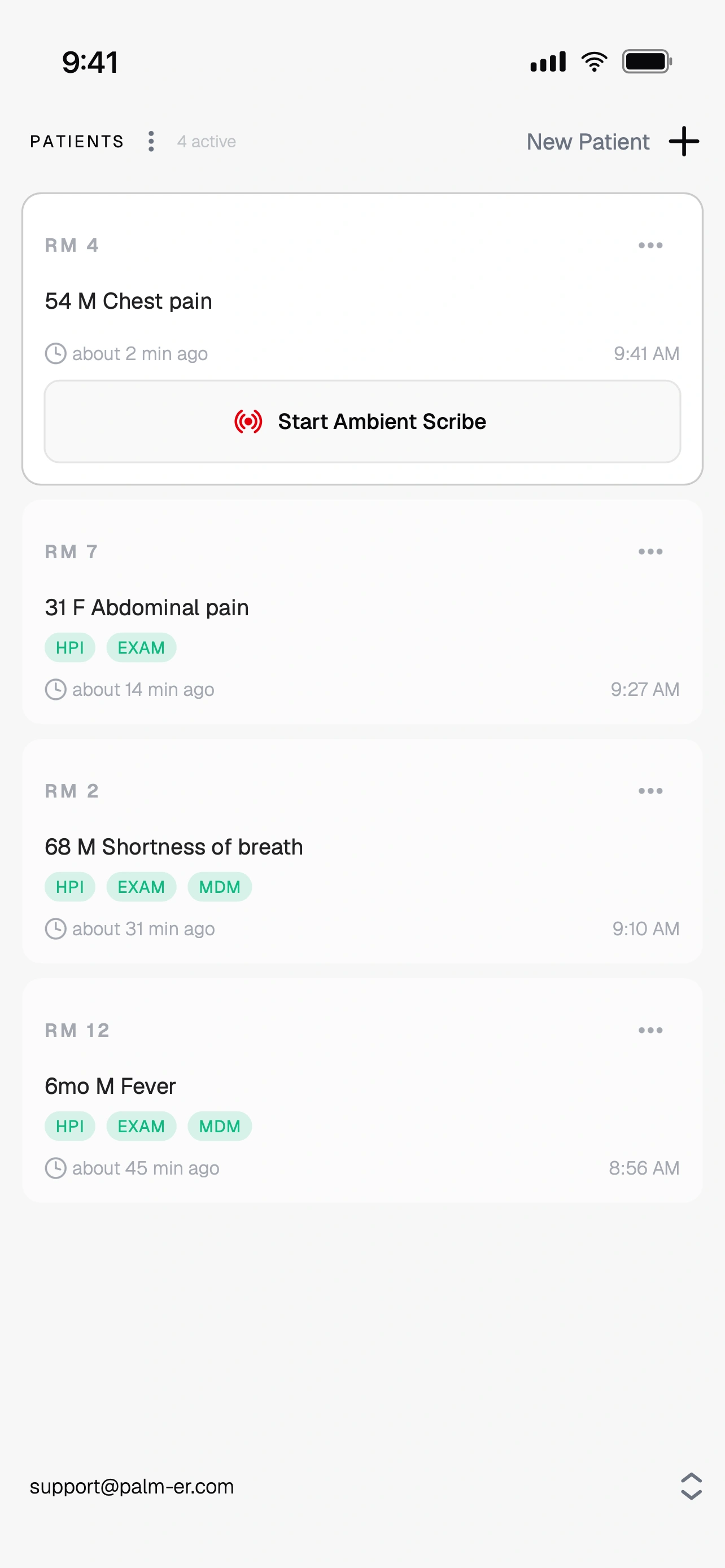
#### Start Ambient Scribe
Select the patient and tap **Start Ambient Scribe**. See your patient while palmER listens in the background. The live waveform moves as it picks up sound, so you can confirm your microphone is working.
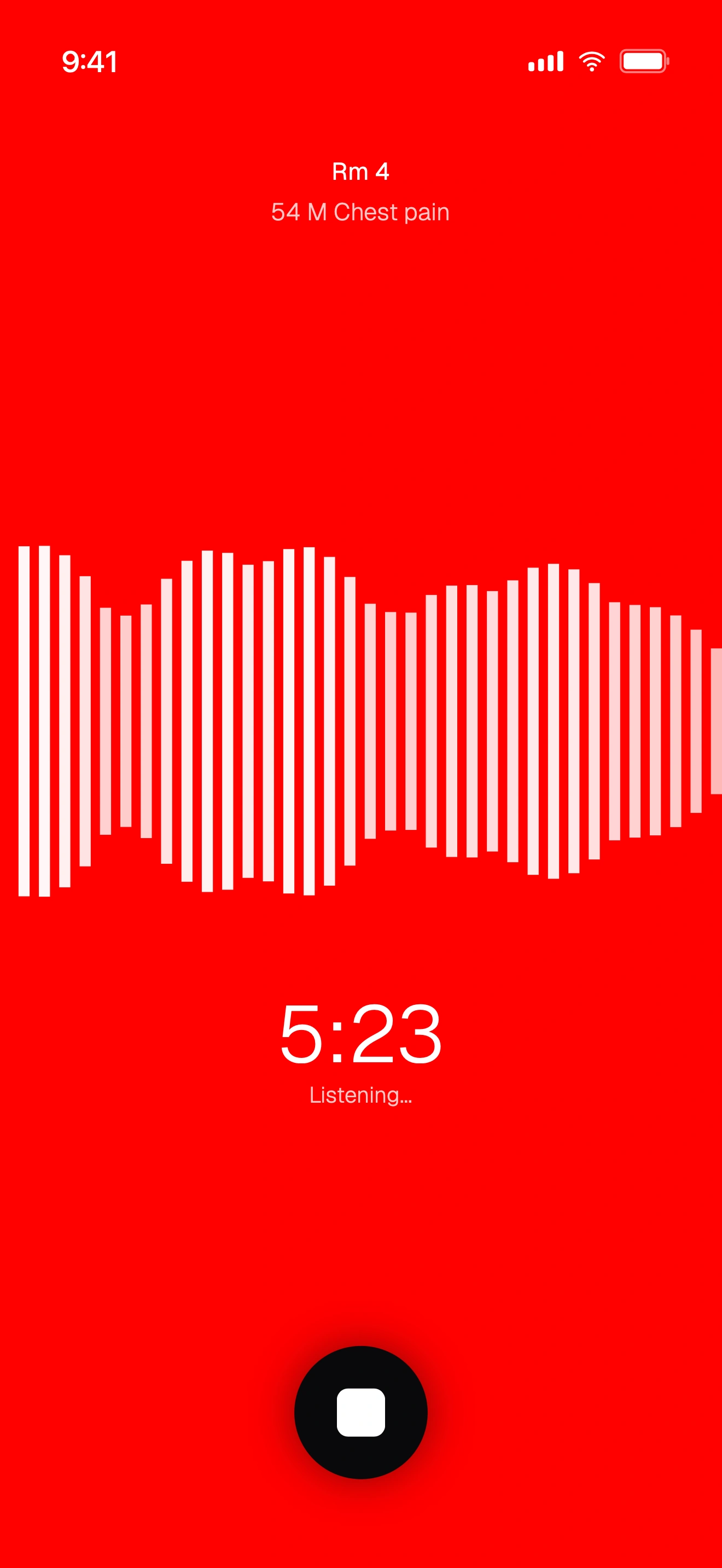
#### Pause and resume if you step away (optional)
Need to pause mid-encounter? **Press and hold the stop button** to pause the session. Tap **Resume** to continue the same session, or **Stop** to finish. Pausing holds through a screen lock or app switch.
#### Stop when you're done
Tap the stop button. You'll see the **Encounter Captured** screen.
#### Add anything that wasn't said aloud (optional)
Add exam findings, details, or corrections. palmER includes them when it writes your notes. This is optional, and you can always edit later on the web.
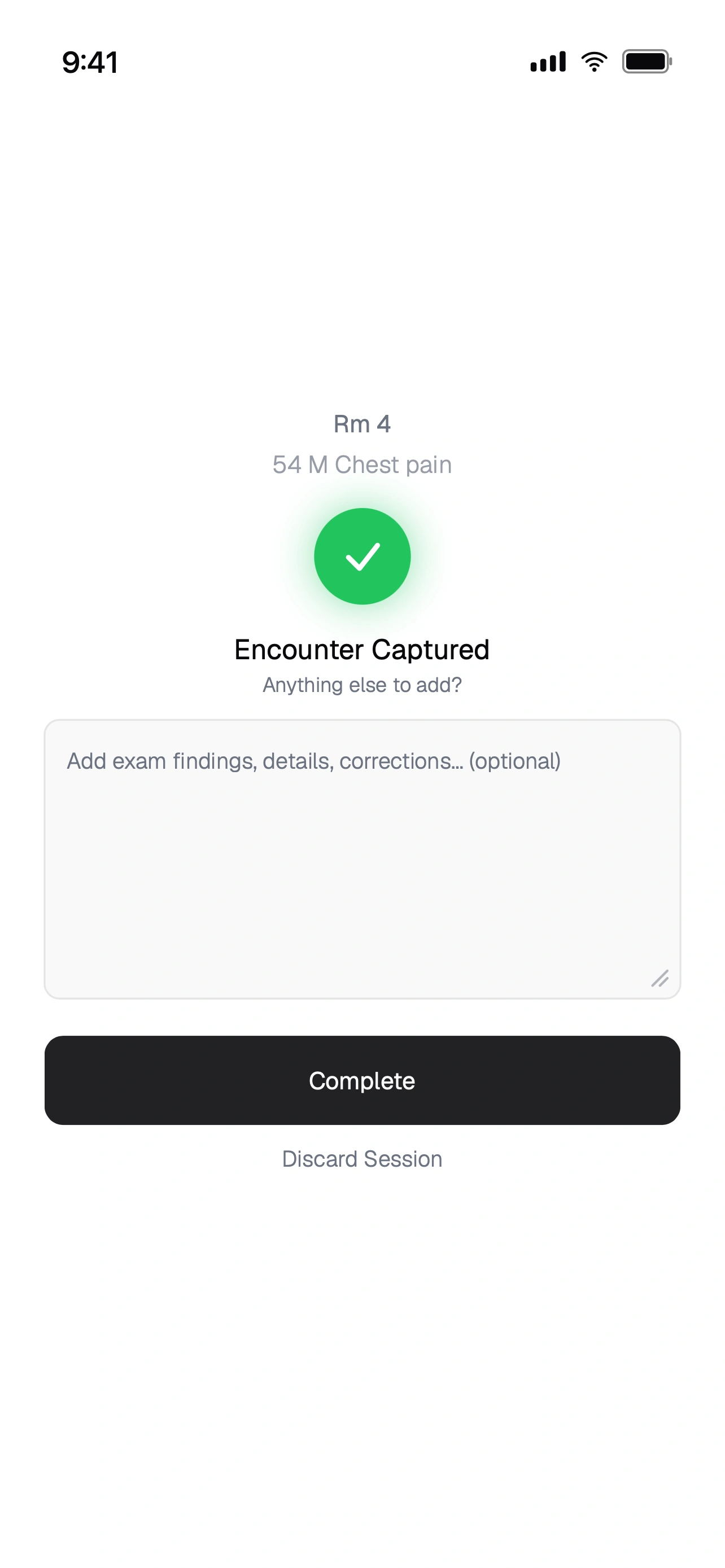
#### Tap Complete
Tap **Complete** and palmER drafts your HPI and Physical Exam. Watch the patient card update as the notes generate. (Changed your mind? Tap **Discard Session** to discard the encounter with nothing saved.)
> **Listening continues through a screen lock**
>
> The app keeps listening when your screen locks or you switch apps, so you can slip your phone in your pocket and stay focused on your patient.
### Scribe on the Web
On the web the flow is nearly identical. The main difference: **Start Ambient Scribe** sits in the upper right of the screen, not on the patient card. Sign in at [platform.palm-er.com](https://platform.palm-er.com) on any computer, pick or create a patient, and click **Start Ambient Scribe** in the upper right. See your patient, click the stop button when you're done, add anything that wasn't said aloud, and click **Complete**. Keep the browser tab open while scribing.
To revisit a transcript later, open the more options menu (**⋯**) on the patient card and select **View/Edit Transcript**.
### After You Finish
- **HPI and Physical Exam generate automatically** in seconds. Review and refine them on the web in [Chart View](/support/docs/palmer-ai-suite/features/chart-view). Your first session always drafts both. After that, a session with nothing new for a note leaves that note unchanged, so a results or discharge conversation does not rewrite your HPI or Exam.
- **Clinical details you discuss are added to your MDM.** Ambient Scribe picks up the results, plans, consults, reassessments, and disposition you discuss. Edit them anytime in the MDM section on the web platform. See [Clinical details captured in Patient Mode](/support/docs/palmer-ai-suite/features/mdm-assistant#clinical-details-captured-in-patient-mode).
- **Start your MDM when you're ready.** Paste your chart into the MDM Assistant on the web platform. palmER brings the chart and captured encounter details together in a structured MDM in seconds. New details from later sessions update the existing MDM automatically.
- **Scribe more than once.** You can scribe additional conversations with the same patient. A session with new history or exam findings re-generates that note as a new version, and you can switch between versions with the [branch picker](/support/docs/palmer-ai-suite/features/chat-editing-and-branching).
> **Prefer to speak your prompts? Use Dictation**
>
> Ambient Scribing captures your conversation **with the patient**, writes the HPI and Exam notes for you, and adds the clinical details you discuss to your MDM. If you just want to speak a prompt instead of typing it, use the mic button in any prompt box. See [Dictation](/support/docs/palmer-ai-suite/features/dictation) for how the two differ.
#### Discharge Instructions After the MDM
On the web platform, you can also enable **Write discharge instructions automatically** under **Settings → DischargER**. It is **off by default**. In Patient Mode, a discharge or transfer MDM starts the instructions, and later MDM changes update them when needed. Find them below MDM in Chart View or in the Discharge Instructions chat tab. See [DischargER](/support/docs/palmer-ai-suite/features/discharger) for the full guide.
### Privacy & Security
> **No Audio Is Ever Saved**
>
> Audio is ephemeral. It is transcribed and immediately discarded. No audio is ever stored on our servers or sent to any third party, and no one, including us, can listen to any encounter.
- **Patient data auto-deletes within 24 hours.** Everything you enter, including patient info, transcripts, and generated notes, is permanently deleted within 24 hours.
- **Your data is never used for AI training.** Your patient encounters and documentation are never used to train AI models.
- **Encrypted in transit and at rest.** All data is encrypted when sent between your device and our servers, and while stored.
- **HIPAA-compliant practices.** Your data is only used for one purpose: generating your documentation.
- **Inspect it yourself.** The self-hosted speech-to-text stack behind Ambient Scribe is open source, so anyone can verify how audio is handled: [github.com/palm-ER/self-hosted-asr](https://github.com/palm-ER/self-hosted-asr).
### Pro Tips
- **Keep the mic near the conversation.** On a phone or a room computer, keep it within a few feet for the best transcription quality.
- **Speak clearly.** palmER handles medical terminology and typical ED background noise well, but mumbling reduces accuracy.
- **Use supplemental context.** Adding exam findings and corrections after scribing can significantly improve your documentation.
---
## /support/docs/palmer-ai-suite/features/mdm-assistant - The MDM Assistant
URL: https://www.palm-er.com/support/docs/palmer-ai-suite/features/mdm-assistant
> Create defensible medical decision making notes in seconds. palmER AI's MDM Assistant combines differential diagnosis, reasoning, and coding in one tool.
Your medical decision-making documentation is where clinical care, billing, and liability intersect. It explains your clinical reasoning, determines the E/M level, and becomes the foundation of your defense if a case ever goes wrong. It's also the hardest and most time-consuming section to write.
palmER's **[MDM Assistant](/palmer/mdm-documentation-ai)** turns your chart into a structured MDM in seconds. In Patient Mode, it also includes the results, plans, consults, reassessments, and disposition captured during your Ambient Scribe sessions.
Your MDM brings together the differential, data reviewed, risk assessment, and rationale for treatment and disposition. It connects the case details to your decisions, giving you a clear account of the care you provided.
### How to Use
#### Paste Your Chart
The more data you provide, the better the MDM. In Patient Mode, palmER also uses details from your Ambient Scribe sessions to write the MDM. Include:
- Chief complaint and [HPI](/support/docs/palmer-ai-suite/features/hpi-assistant)
- Vitals and [physical exam](/support/docs/palmer-ai-suite/features/physical-exam-assistant)
- Past medical history
- Labs, imaging, EKGs, and treatments
- Consults and disposition plan
#### Generate the MDM
The assistant will produce a structured, high-quality MDM that includes:
- Clinical reasoning
- Differential diagnosis
- Risk assessment
- Disposition and follow-up
#### Review Sidebar Insights
In addition to the MDM, you'll see:
- "Can't Miss" and "Most Likely" diagnoses
- Evidence-based clinical insights
- Recommended tests and treatment plans
### Clinical Details Captured in Patient Mode
When you use Ambient Scribe, palmER captures the results, plans, consults, reassessments and disposition you discuss during the encounter. Each one appears as a short item in a list under the MDM section in Chart View and above the MDM in Chat View on the web platform.
- **Included when you generate.** Every item in the list goes in alongside the chart you paste. You still start the MDM yourself.
- **Kept up to date.** After the MDM exists, new items from later sessions, and any item you edit, delete or add, update the MDM automatically as a new version. Earlier versions stay in the version history, and your MDM Documentation Preferences still apply.
- **Markers.** A check marks an item already in the MDM version you're viewing; an open circle marks a new item not yet included.
- **You stay in control.** Hover an item to edit or delete it, or click **Add...** to type one. Click a time to change it. Discarding a session removes the items it captured; items you typed yourself stay. The list holds up to 50 items.
### Automatic Discharge Instructions
In Patient Mode, your MDM can also start the patient's discharge instructions. Turn on **Write discharge instructions automatically** under **Settings → DischargER**; it is **off by default**.
When the current MDM identifies discharge or transfer, palmER drafts **Discharge Instructions** below MDM in Chart View and in a separate Chat View tab. Later MDM changes update the instructions when the patient's directions need to change. Review, refine, and copy them from either view.
See [DischargER](/support/docs/palmer-ai-suite/features/discharger) for the full walkthrough, including work and school notes.
### What You Get
The MDM Assistant delivers a complete, structured narrative of your case. It walks through which diagnoses you considered, why you ordered specific tests, and how you arrived at your clinical decision. Each MDM reflects the complexity of your reasoning through clear risk stratification and thorough data review, including labs, imaging, and consultant recommendations.
It also captures the nuances of your patient's story — shared decision making, the thoughtful handling of diagnostic uncertainty, and clear return precautions.
The result is documentation that works on three levels at once. It supports you medicolegally by showing systematic clinical reasoning and thorough evaluation. It supports your billing by capturing the true complexity and decision-making difficulty of the case. And it reflects the high quality of care you delivered.
### Follow-up Refinements
After generating an MDM, you can use follow-up prompts to make per-note adjustments. Many of the refinements below are also strong candidates for [Documentation Preferences](/support/docs/palmer-ai-suite/features/documentation-preferences) (if you want them every time) or [Snippets](/support/docs/palmer-ai-suite/features/snippets) (if you want one-click reuse without making them permanent).
You can use follow-up prompts to:
**Revise Content:**
- `Add discussion of why stroke was considered and ruled out`
- `Include more detail about the shared decision-making process`
- `Expand on the rationale for not obtaining CT imaging`
**Update data:**
- `Patient's troponin came back at 0.8, update the MDM`
- `Cardiology recommended admission for cath, revise disposition`
- `Add the CT results showing no acute findings`
---
**Customize Formatting:**
If you want a specific template applied to every MDM, paste it into your MDM Assistant [Documentation Preferences](/support/docs/palmer-ai-suite/features/documentation-preferences) so it runs automatically. If you only want the template for select cases, use it as a follow-up prompt below, or save it as a [Snippet](/support/docs/palmer-ai-suite/features/snippets) for one-click insertion.
```
Format using this structure:
Chief Complaint:
Problems Addressed:
- Primary Problem:
- Secondary Problems:
- Differential Diagnosis:
Data Reviewed:
- History:
- Nursing notes were reviewed:
- Independent Historian: A discussion was had with an independent historian, [ ], secondary to
[ ]
- Vital Signs:
- Physical Exam Findings:
- Diagnostic Tests:
- Labs (I independently reviewed and interpreted all the blood work and used the
interpretation for my medical decision-making.):
- Imaging (The following radiology tests were ordered and results reviewed by me and
used the interpretation for my medical decision-making):
- EKG:
- Tests considered but not ordered:
- Consultations:
- Prior Records:
Clinical Decision Tools:
Assessment:
Plan:
- Interventions:
- Medications:
- Disposition:
- Follow-Up:
- Return Precautions:
- Patient Education:
- Social Determinants of health that impact treatment or disposition:
- Shared Decision-making:
Risk Assessment:
Medical Complexity:
Billing Codes:
- Suggested E/M Level:
- ICD-10 Codes:
- CPT Codes:
```
### How It Works: The Clinical Analysis Sidebar
The Clinical Analysis Sidebar works alongside your MDM, surfacing the differentials, workup recommendations, and clinical insights that matter most for your case. It's like having a second set of eyes on the chart, so you can verify your reasoning at a glance without breaking your workflow.
To open the Clinical Analysis Sidebar, click the **<** arrow on the right side of the screen after generating your MDM.
#### Differential Diagnosis Made Simple
The **Differential Diagnosis** panel works quietly in the background, generating a thoughtful, clinically grounded differential. You see it organized exactly the way you think: the dangerous things that could kill your patient, as well as the most likely culprits.
Unlike generic differential tools that produce broad, unfiltered lists, palmER AI Suite uses Bayesian-style reasoning to analyze each case in context. It interprets findings and distinguishes subtle clinical nuances the way an experienced clinician would, producing focused, high-yield differentials that reflect expert reasoning.
#### Context-Aware Clinical Guidance
The **[Clinical Insights](/palmer/features/clinical-insights)** panel provides personalized, context-aware guidance. It analyzes your case to highlight what truly matters for this specific patient — recommended workup, treatment considerations, and disposition planning tailored to the clinical picture.
#### Your Workflow, Enhanced
Everything integrates into a clean, uncluttered workspace built by physicians who understand what you need to see and when you need to see it.
Just paste in your chart. Within seconds, you get an MDM that reads like you wrote it, because in essence, you did. The AI structures your thinking into documentation that's complete, defensible, and true to the complexity of your medical decision making. When labs come back or consultants weigh in, simple commands like "update with new troponin" or "add cardiology recommendations" reshape the narrative instantly.
### Optimization Strategies
**Input Enhancement Tips**
**Maximize Clinical Detail:**
- Include specific vital signs with trends over time
- Document exact laboratory values and timing
- Note specific physical exam findings and their progression
- Describe patient response to interventions and treatments
**Enhance Clinical Context:**
- Mention relevant past medical history and medications
- Include social history when pertinent to the presentation
- Note family history if relevant to differential diagnosis
- Document patient concerns and preferences
**Workflow Integration**
**Efficient Documentation Process:**
1. **Start with the chart information you have** and add new results as the encounter progresses
2. **Use the HPI and Physical Exam Assistants** first for complete clinical picture
3. **Review differential and orders**
4. **Generate and refine** MDM with follow-up prompts, snippets, or preference tweaks as needed
**Quality Assurance:**
- Review generated differential against your clinical thinking
- Verify recommended orders align with your clinical judgment
- Ensure MDM captures your actual decision-making process
- Customize documentation to match your preferences
### Educational and Quality Applications
**Resident Training**
**Systematic Documentation:**
- Demonstrates comprehensive approach to clinical reasoning
- Shows integration of history, physical, and diagnostic data
- Models appropriate differential diagnosis consideration
- Teaches billing and compliance documentation standards
**Quality Improvement:**
- Standardizes documentation across clinicians
- Reduces variation in clinical reasoning documentation
- Supports peer review and case discussion
- Enables tracking of diagnostic accuracy and efficiency
**Professional Development**
**Clinical Excellence:**
- Exposure to evidence-based diagnostic and treatment approaches
- Continuous learning through guideline integration
- Pattern recognition enhancement through systematic analysis
- Decision-making skill development through structured thinking
**Practice Optimization:**
- Documentation efficiency improvement
- Billing optimization through appropriate complexity capture
- Risk management through comprehensive documentation
- Patient satisfaction through improved communication and care coordination
### A Better Way to Document
The MDM Assistant turns documentation into a fast, intuitive process. In seconds, you create clear, comprehensive notes that reflect your clinical reasoning and meet the highest standards for billing, compliance, and risk management. It captures the true complexity of your cases, supports accurate coding, and ensures your documentation is defensible and thorough. Less time charting, more time for everything else.
---
## /support/docs/palmer-ai-suite/features/discharger - DischargER
URL: https://www.palm-er.com/support/docs/palmer-ai-suite/features/discharger
> palmER DischargER writes patient-specific discharge instructions and work or school notes for emergency and urgent care, with optional automatic writing.
Your patients aren't one-size-fits-all. Their discharge instructions shouldn't be either.
**DischargER** writes clear, personalized discharge instructions, work notes, school notes, and any other documents your patient needs.
### What DischargER Writes
Anything your patient needs to take with them:
- Discharge and aftercare instructions
- Work notes and return-to-work notes
- School notes and daycare notes
- Sports and return-to-play notes
- Activity restriction notes
- Excuse and clearance letters
### Clear Instructions, Relevant Details
Patients, parents, and caregivers get clear, practical instructions. Work and school notes include only what the recipient needs, leaving out diagnoses, test results, medications, and other clinical details unless you ask to include them.
### Where to Find It
#### Assistant workflow
Open **DischargER** under **Tools**, paste the chart, and ask for the document you need.
#### Patient workflow
Open the right sidebar and select **DischargER**. The chart is already loaded, so just ask for the document you need.
### Automatic Discharge Instructions
In Patient Mode, palmER can automatically write discharge instructions for discharged patients.
Automatic writing is **off by default**. Turn on **Write discharge instructions automatically** in **Settings → DischargER**.
After you write the MDM, the instructions appear below it in **Chart View** and in a **Discharge Instructions** tab in **Chat View**. Review, edit, and copy them there. They update as your MDM changes.
To add a work, school, or daycare note button beside the instructions, turn on **Work and school notes** in the same settings. This is also off by default. Click the button to write the note, then edit and copy it separately.
### One-Tap Suggestions
Tap a suggestion or enter your own instructions. You can create any document your patient needs.
### What DischargER Includes
DischargER creates patient-specific discharge instructions, including home care guidance, follow-up recommendations, and return precautions. It also explains important results, pending tests, and incidental findings that need follow-up in clear language for the patient.
### Your Documentation Preferences
Your custom instructions for patient-facing documents live in **Settings → DischargER → Documentation Preferences**, under your user menu. Set them once, and every DischargER document follows them, including automatically written instructions.
For example:
```
- Always thank the patient for choosing our emergency department.
- Write discharge instructions at a 5th grade reading level.
- Refer to our hospital as "Memorial General Emergency Department".
```
### Refining a Document
You can edit and refine a document without starting over. Ask DischargER to make the instructions shorter, simplify the language, translate them, add a specific restriction, or create another document for the same patient.
To refine automatically written instructions, use their Chart View section or Chat View tab. Requests in the DischargER sidebar produce separate replies.
---
## /support/docs/palmer-ai-suite/features/hpi-assistant - The HPI Assistant
URL: https://www.palm-er.com/support/docs/palmer-ai-suite/features/hpi-assistant
> Generate complete, structured HPIs from just a few words. Expands brief clinical summaries into chart-ready documentation in seconds.
The [HPI Assistant](/palmer/assistants/hpi) lets you instantly generate a high-quality history of present illness note from just a few words. Simply enter a short patient summary, and the assistant will produce a full, structured HPI. Saving you time while maintaining clinical clarity.
> **Get Started Quickly**
>
> Input a brief summary like `74M, L sided weakness, R facial droop, slurred
> speech x 1 hour` and watch it expand into a comprehensive history.
### How It Works
#### Simple Input, Comprehensive Output
Enter a brief summary of the patient presentation:
**Example Input:**
```
74M, L sided weakness, R facial droop, slurred speech x 1 hour
```
**Generated HPI:**
```
The patient is a 74-year-old male presenting with acute onset left-sided weakness,
right facial droop, and slurred speech that began approximately one hour prior to
arrival. He denies headache, vision changes, dizziness, chest pain, palpitations,
shortness of breath, fever, or recent trauma. He denies prior similar episodes,
recent falls, or seizure activity. No history of anticoagulant use or recent
surgery. He denies numbness, difficulty swallowing, or loss of consciousness.
```
The assistant expands your brief input into a complete, professionally structured history with precise timing, appropriate medical terminology, functional impact, pertinent negatives, associated symptoms, and relevant context clues, all woven into a comprehensive clinical narrative.
#### Input Flexibility
The HPI Assistant works with various input styles:
- **Chief complaint format**: `45F, chest pain x 2 hours`
- **Triage notes**: `SOB, productive cough, fever x 3 days`
- **EMS report**: `MVA, LOC, c/o neck pain`
- **Bullet points**: `Headache, photophobia, nausea, no fever`
- **Brief narratives**: `Patient reports worsening abdominal pain since yesterday`
#### What Gets Added Automatically
The assistant automatically enhances your input by converting lay terms to clinical language, adding relevant review of systems elements, clarifying onset and duration, including appropriate quality descriptors and pain scales, incorporating pertinent negatives, and documenting any functional impacts.
### HPI Assistant Interface
The HPI Assistant transforms brief clinical input into comprehensive, structured histories:
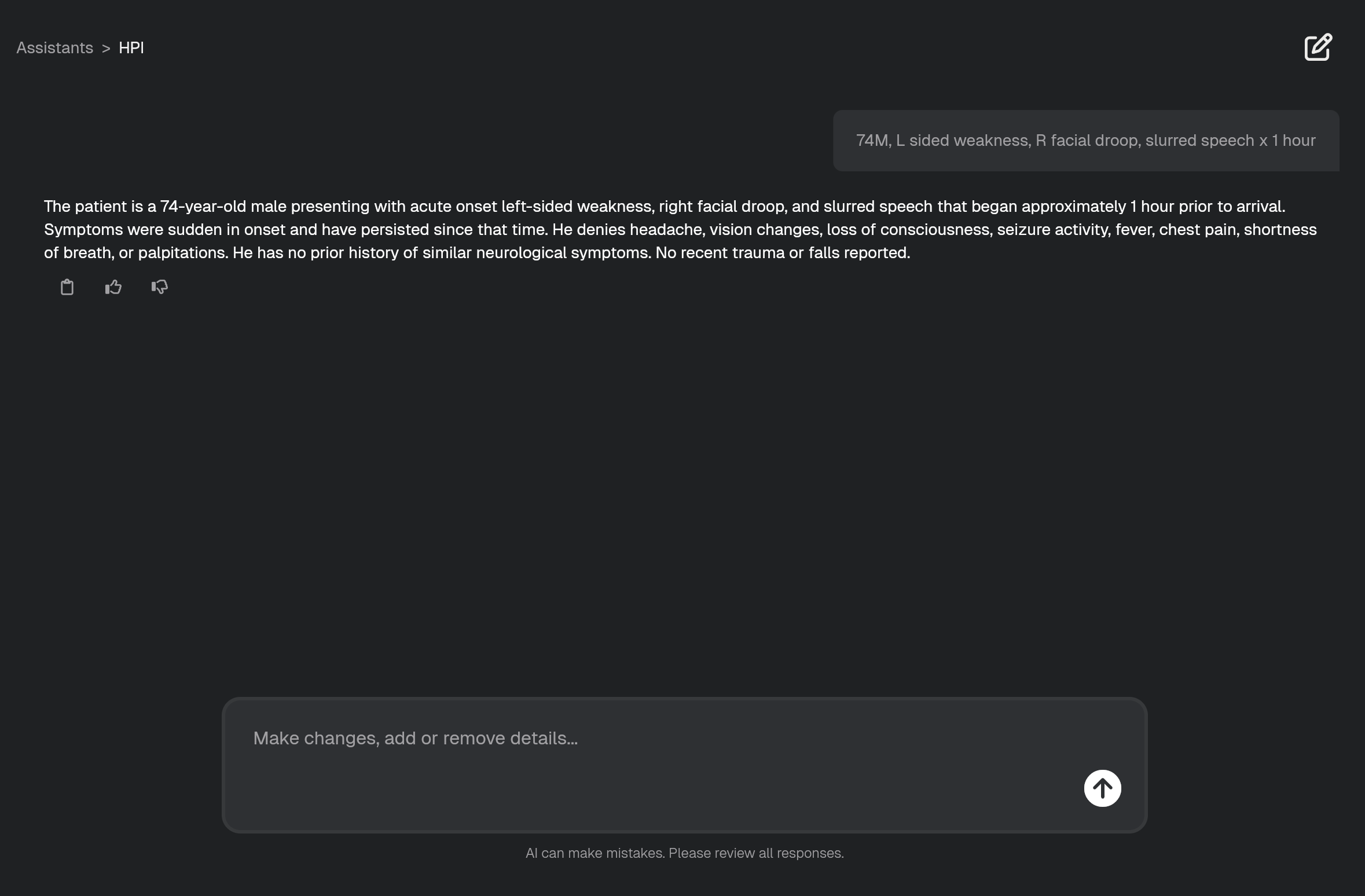
The screenshot demonstrates how a simple input like `74M, L sided weakness, R facial droop, slurred speech x 1 hour` becomes a comprehensive, clinically appropriate HPI. The output provides a detailed symptom description using appropriate medical terminology, a clearly documented timeline and onset, pertinent negatives relevant to the presentation, and clinical context to support medical decision-making.
### Flexible Follow-up and Refinement
#### Real-Time Modifications
After generating an HPI, easily refine the output with natural language commands:
> **Smart Updates**
>
> The assistant understands context and integrates new information without requiring you to regenerate the entire history.
**Add clinical details:**
- `Include that he's on warfarin`
- `Add that family witnessed the event`
- `Note he has a history of MI`
**Adjust focus and length:**
- `Make this shorter for a fast track patient`
- `Expand the timeline section`
- `Focus more on the pain characteristics`
**Format modifications:**
- `Format as bullet points`
- `Use our department's HPI template`
- `Add more pertinent negatives`
#### Customize the Output
Customize palmER to match your preferred format by using [Documentation Preferences](/support/docs/palmer-ai-suite/features/documentation-preferences):
```
Format using this structure:
- Chief Complaint:
- History of Present Illness:
- Review of Systems:
- Past Medical History (relevant):
- Medications (relevant):
```
### Key Benefits
#### Speed and Efficiency
Generate comprehensive histories in seconds rather than minutes, with output formatted and ready to paste directly into your EMR.
#### Clinical Quality
You capture all essential history elements without having to think about what you might have missed. The assistant automatically includes pertinent positives and negatives, uses appropriate medical terminology that supports clinical decision-making, and structures the history in a way that's defensible and anchors your diagnostic reasoning.
Every HPI follows a consistent, standardized structure that your entire team can rely on. This consistency makes your documentation thorough and organized and improves clinical communication. And it serves as a great teaching tool, giving residents and students a consistent reference for proper HPI structure and content.
#### Workflow Integration
The HPI Assistant is designed to fit right into your workflow. It works with any EMR, and you can use Documentation Preferences to customize the output to match your preferred format and style. Paste the generated HPI directly into your EMR or use it as input for other palmER tools. Modify it as your case evolves. It's also great for creating clear sign-out summaries.
### Integration with Other palmER Tools
#### The Workflow
#### Start with HPI Assistant
Generate the HPI from your brief clinical input.
#### Use Physical Exam Assistant
Paste in the HPI and note any abnormal exam findings.
#### Complete with MDM Assistant
Paste in your chart to generate the MDM. In Patient Mode, palmER also includes the details captured during your Ambient Scribe sessions.
### Pro Tips for Optimal Results
#### Input Best Practices
- **Include timing** - `x 2 hours` vs `recently` provides better context
- **Add severity** - `severe` vs `moderate` helps with urgency assessment
- **Note progression** - `worsening` vs `stable` vs `improving`
- **Include triggers** - `after exercise` or `at rest` adds diagnostic value
- **Mention location** - `left-sided` vs `bilateral` guides examination
#### Common Input Examples by Chief Complaint
**Chest Pain:**
```
55M, substernal chest pain x 30 min, diaphoretic, radiates to left arm
```
**Shortness of Breath:**
```
68F, SOB and productive cough x 3 days, worsening, unable to walk upstairs
```
**Abdominal Pain:**
```
23F, RLQ pain x 6 hours, sharp, worse with movement, nausea
```
**Headache:**
```
34M, sudden severe headache x 1 hour, worst of life, photophobia
```
> **Ready to Try It?**
>
> Sign up for a free trial and experience the HPI Assistant in action. [Start
> Now](https://platform.palm-er.com/signup)
---
---
## /support/docs/palmer-ai-suite/features/physical-exam-assistant - The Physical Exam Assistant
URL: https://www.palm-er.com/support/docs/palmer-ai-suite/features/physical-exam-assistant
> Generate complaint-specific physical exam documentation in seconds. AI-powered exam notes for emergency medicine — thorough, defensible, EMR-ready.
Stop spending longer charting the exam than performing it. The **Physical Exam Assistant** generates clean, clinically focused physical exam documentation from a short case summary. Or automatically with Ambient Scribing. Your notes are tailored to the clinical context, thorough, and ready to paste into your EMR.
### How It Works
#### Intelligent Exam Generation
Paste the HPI (or a brief summary) and add any abnormal exam findings.
**Example Input:**
```
78M, L sided weakness, R facial droop, slurred speech x 1 hour
```
**Generated Physical Exam:**
```
Gen: Elderly male, NAD
HEENT: NCAT, PERRL, right facial droop
Neck: Trachea midline
CV: RRR, distal pulses intact
Resp: CTAB
Abd: Soft, non-tender
Ext: Left-sided weakness, no deformities
Skin: Warm, dry, intact
Neuro:
- Mental Status: AAOx3
- Speech: Slurred
- Cranial Nerves: Right facial droop, tongue midline
- Motor: LUE and LLE diminished, R side normal
- Sensory: Decreased to light touch on left
- Coordination: No ataxia
- Gait: Not tested due to clinical condition
- Reflexes: 2+ and symmetric
Psych: Appropriate mood and affect
NIHSS:
1A. Level of Consciousness: 0
1B. Ask Month and Age: 0
1C. Blink Eyes & Squeeze Hands: 0
2. Best Gaze: 0
3. Visual: 0
4. Facial Palsy: 2
5A. Motor - Left Arm: 2
5B. Motor - Right Arm: 0
6A. Motor - Left Leg: 2
6B. Motor - Right Leg: 0
7. Limb Ataxia: 0
8. Sensory Loss: 1
9. Best Language: 1
10. Dysarthria: 1
11. Extinction and Inattention: 0
Total: 9/42
```
The assistant generates a comprehensive physical exam tailored to the clinical context. For a suspected stroke, this means a thorough neurologic assessment along with a screening of other relevant systems. It also incorporates appropriate scoring systems, like the NIHSS or GCS, when indicated. The result is a complete examination that documents all pertinent findings for your clinical scenario.
---
#### Smart & Relevant Exams
The Physical Exam Assistant understands clinical context. When you enter chest pain, it automatically generates a detailed cardiovascular and pulmonary examination. Abdominal pain triggers comprehensive GI and GU assessments. Trauma cases get systematic surveys with focused injury evaluations. Headache complaints receive thorough neurologic and HEENT exams.
Every exam follows expert documentation practices and proper medical terminology & abbreviations. The assistant organizes findings systematically, detailing relevant systems while screening others. Findings are captured to align with the clinical context and anchor the medical decision-making. The result: you get thorough, clinically sound documentation in seconds.
---
#### See the Physical Exam Assistant in action:
The Physical Exam Assistant generates comprehensive, complaint-specific physical examinations from minimal input:
Video without sound: the clinician enters "74M L sided weakness, R facial droop, slurred speech x 1 hour" in the Physical Exam Assistant. palmER returns a complete physical exam with a detailed neurologic section and an NIHSS breakdown totaling 13/42.
### Flexible Follow-Up and Customization
#### Real-Time Modifications
Easily adjust the generated exam with natural language commands:
**Expand specific systems:**
- `Expand the neurologic section with more detail`
- `Add a complete musculoskeletal exam`
- `Include a detailed psychiatric assessment`
**Modify clinical findings:**
- `Change NIHSS to 8`
- `Add bilateral lower extremity edema`
- `Note patient is intubated and sedated`
**Adjust documentation style:**
- `Format as bullet points`
- `Use more concise language`
- `Add more pertinent negatives`
#### Customize the Output
Customize palmER to match your preferred format by using [Documentation Preferences](/support/docs/palmer-ai-suite/features/documentation-preferences):
```
Format using our physical exam template:
- Vital Signs:
- General Appearance:
- HEENT:
- Cardiovascular:
- Pulmonary:
- Abdomen:
- Neurologic:
- Skin:
- Extremities:
```
#### Progressive Documentation
Build the exam as you evaluate the patient:
1. **Initial generation**: Basic exam based on chief complaint
2. **Add findings**: `Patient has 3/6 systolic murmur at LUSB`
3. **Include procedures**: `After intubation, bilateral breath sounds equal`
4. **Update status**: `Post-sedation, patient arousable to voice`
> **Contextual Understanding**
>
> The assistant maintains clinical context as you add new findings and modify
> the examination.
### Your Exams, Faster and Better
The Physical Exam Assistant transforms how you document patient encounters. Charting the exam shouldn't take longer than the actual exam itself. Generate complete, clinically appropriate physical exams in seconds instead of digging through templates or clicking repetitive normal findings. The system understands clinical context and automatically details the relevant body systems while screening others.
Every exam uses proper medical terminology and follows documentation best practices and medico-legal expert recommendations. You get the right level of detail without missing critical elements or carrying forward outdated template sections. When you need to modify findings, just tell the assistant what changed and it updates instantly.
#### Built for Emergency Medicine
The assistant adapts to your clinical reality. Whether you're documenting a stroke with automatic NIHSS scoring, a trauma with primary and secondary surveys, or a psychiatric presentation with mental status assessment, the assistant generates the documentation you need. Pediatric cases get age-appropriate exam techniques automatically. Findings are documented to support your medical decision-making and treatment choices. The result is thorough, defensible documentation that stands up to scrutiny.
#### Real-World Applications
Fast track shifts move faster when you can generate focused exams for low-acuity complaints without sacrificing quality. During busy shifts, maintain documentation standards even when time is short. Residents see examples of proper exam documentation for every presentation. Your department gains consistency across clinicians and builds defensible records.
The Physical Exam Assistant isn't about replacing clinical judgment. It's about giving you back the time spent on documentation mechanics so you can focus on patient care.
### Pro Tips for Best Results
#### Input Optimization
- **Include acuity level** - `stable` vs `critical` changes exam focus
- **Note procedures** - `intubated` or `sedated` modifies neurologic exam
- **Mention timing** - `on arrival` vs `after treatment` provides context
- **Add vital signs** - Abnormal vitals guide examination emphasis
#### Common Use Cases
**Stroke/Neurologic:**
```
72F, acute onset LLE LUE weakness, slurred speech
```
**Chest Pain:**
```
58M, substernal chest pressure x 2 hours radiating to RUE, diaphoretic
```
**Trauma:**
```
23 y/o male, MVA, unrestrained driver, c/o chest and abdominal pain, stable vitals
```
**Pediatric:**
```
3yo, fever and irritability x 2 days, coughing, looks well, no vomiting
```
---
## /support/docs/palmem/introduction/overview - palmEM AI Overview
URL: https://www.palm-er.com/support/docs/palmem/introduction/overview
> palmEM AI is a comprehensive emergency medicine reference app for iOS and Android. Access AI-powered clinical guidance instantly at the bedside.
palmEM AI is a comprehensive clinical reference app designed specifically for emergency medicine professionals. Available on iOS and Android, it provides instant access to the clinical information you need most during high-pressure shifts - protocols, differential diagnoses, medication dosing, clinical calculators, and an intelligent AI assistant that answers any EM question you have.
Whether you're an attending, resident, PA, NP, paramedic, or medical student, palmEM AI puts expert-level emergency medicine knowledge in your pocket. It's the clinical reference you'll reach for dozens of times every shift.
### What Makes palmEM AI Different
**Built for Emergency Medicine:** Every feature, every protocol, every piece of content is tailored specifically for emergency medicine. This isn't a general medical reference adapted for the ED - it was built from the ground up for how we actually practice.
**AI-Powered Clinical Assistant:** Ask any emergency medicine question in plain language and get comprehensive, evidence-based answers instantly. No searching through topics or scrolling through irrelevant information - just ask and get the answer you need.
**Always in Your Pocket:** Mobile-first design means you have instant access whether you're at the bedside, in a resuscitation bay, or responding to a field call. Fast, intuitive, and designed for one-handed use during patient care.
**Works Offline:** Full offline access to all clinical content means you're never without critical information, even when hospital WiFi is down or you're in a dead zone.
### Comprehensive Emergency Medicine Content
palmEM AI provides everything you need for clinical decision-making:
- **Clinical Protocols:** Evidence-based management guidelines for hundreds of presentations
- **Differential Diagnoses:** Comprehensive DDx lists organized by complaint and system
- **Medication Reference:** Dosing, contraindications, and administration for EM medications
- **Clinical Calculators:** NEXUS, Wells, PERC, HEART score, and dozens more
- **Procedures:** Step-by-step guidance for common ED procedures
- **Algorithms:** Visual flowcharts for complex decision-making
- **Pediatric Content:** Weight-based dosing, age-specific protocols, and pediatric EM guidance
All content is continuously updated to reflect current guidelines and best practices.
### AI Assistant: Your Intelligent Clinical Companion
The AI Reference feature transforms your phone into an intelligent clinical consultant. Ask questions naturally:
- `What's the workup for atraumatic leg pain in a 60-year-old?`
- `Rocuronium dosing for RSI`
- `ECG criteria for posterior MI`
- `Approach to undifferentiated shock`
Get comprehensive, evidence-based answers instantly - no navigating menus or searching through content. The AI understands medical terminology and provides responses tailored to emergency medicine practice.
### Designed for Your Workflow
**Fast Search:** Find what you need in seconds.
**Bookmarks:** Save your most-used protocols and references for one-tap access during critical moments.
**Personal Notes:** Add your own notes to any topic - institutional protocols, personal pearls, or department-specific guidance.
**Customizable:** Organize content the way you work, with favorites and recently viewed items always accessible.
### Accessible When You Need It Most
palmEM AI works on iOS and Android smartphones and tablets. The mobile-first design means it's always with you - in your pocket during rounds, readily available during resuscitations, accessible during ambulance transfers.
Offline functionality ensures you have access to critical clinical information even without internet connectivity. Download content once, use it anywhere, anytime.
---
## /support/docs/palmem/introduction/key-features-and-benefits - Key Features and Benefits of palmEM AI
URL: https://www.palm-er.com/support/docs/palmem/introduction/key-features-and-benefits
> Explore the powerful features of palmEM AI - the mobile emergency medicine reference app that puts clinical knowledge and AI-powered guidance in your pocket.
palmEM AI isn't just another reference app. It's the clinical tool you'll use multiple times every shift - whether you need a quick medication dose, want to double-check a protocol, or need an instant second opinion on a complex case. Here's what makes it essential for emergency medicine practice.
### AI-Powered Clinical Assistant
**Ask Anything, Get Expert Answers**
The AI Reference is like having an experienced EM attending in your pocket. Type any clinical question in plain language and get comprehensive, evidence-based answers instantly:
- Differential diagnoses for complex presentations
- Treatment protocols and management approaches
- Medication dosing and contraindications
- Procedure techniques and complications
- ECG and imaging interpretation guidance
- Risk stratification strategies
No more searching through topics or scrolling to find what you need. Just ask your question and get a tailored answer based on current emergency medicine evidence and guidelines.
### Comprehensive Clinical Content
**Everything You Need for EM Practice**
palmEM AI covers the full spectrum of emergency medicine:
- **Hundreds of Clinical Topics:** From abdominal pain to wound care, covering adult and pediatric presentations
- **Evidence-Based Protocols:** Management guidelines based on current literature and expert consensus
- **Medication Reference:** Complete dosing, administration routes, contraindications, and adverse effects
- **Clinical Calculators:** NEXUS, Wells, PERC, HEART, CHADS2-VASc, PECARN, and many more
- **Differential Diagnoses:** Organized by chief complaint and clinical presentation
- **Procedures:** Step-by-step guidance with indications, contraindications, and techniques
- **Algorithms:** Visual decision trees for complex clinical scenarios
All content is written specifically for emergency medicine practice - concise, actionable, and designed for point-of-care use.
### Lightning-Fast Search
**Find What You Need in Seconds**
Our intelligent search understands how emergency medicine clinicians think:
- Recognizes medical abbreviations and synonyms
- Searches across all content types simultaneously
- Shows relevant results as you type
- Understands both formal terms and common shorthand
Search for "CP" or "chest pain" or "ACS" - they all work. The search is designed to be fast enough for use during active resuscitations.
### Bookmarks and Personalization
**Customize for Your Practice**
Make palmEM AI work the way you work:
- **Bookmark Your Go-To Content:** One-tap access to your most-used protocols, medications, and calculators
- **Add Personal Notes:** Supplement any topic with your own institutional protocols, personal pearls, or department-specific guidance
- **Recent History:** Quickly return to content you've viewed recently
- **Organized by Your Needs:** Content organized logically for emergency medicine workflow
### Works Offline
**Reliable When You Need It Most**
Full offline functionality means you're never without access:
- All clinical content available without internet
- Works in signal dead zones and during network outages
- Perfect for rural EDs and remote practice locations
- AI features require connection, but core content is always accessible
Download once, use everywhere.
### Always Current
**Stay Up-to-Date with EM Guidelines**
Medical knowledge evolves rapidly. palmEM AI keeps pace:
- Regular content updates reflecting new guidelines and evidence
- Rapid updates for major guideline changes
- Continuous refinement based on user feedback
- Performance improvements and new features
Updates happen automatically - you always have access to current information.
### Mobile-First Design
**Built for Bedside Use**
Every aspect of palmEM AI is optimized for mobile use during patient care:
- Fast loading and responsive interface
- One-handed operation during procedures
- Clean, readable typography even in poor lighting
- Minimal taps to reach information
- Works on phones and tablets
Designed by emergency physicians who use it clinically, for the realities of ED practice.
### For Every Level of Training
Whether you're a medical student on your first EM rotation or an experienced attending, palmEM AI provides value:
- **Students and Residents:** Learn evidence-based approaches while building clinical knowledge
- **Mid-Level Providers:** Quick reference for less common presentations
- **Attending Physicians:** Verify protocols and dosing, especially for pediatric cases
- **Educators:** Teaching tool for bedside teaching and case discussions
Ready to have emergency medicine expertise in your pocket? Check out our [Getting Started guide](/support/docs/palmem/getting-started/getting-started-with-palmem) to learn how to use palmEM AI effectively.