 palmER
The HPI Assistant.
Generate complete, structured HPIs from just a few words. Expands brief clinical summaries into chart-ready documentation in seconds.
The HPI Assistant lets you instantly generate a high-quality history of present illness note from just a few words. Simply enter a short patient summary, and the assistant will produce a full, structured HPI. Saving you time while maintaining clinical clarity.
Get Started Quickly
Input a brief summary like 74M, L sided weakness, R facial droop, slurred speech x 1 hour and watch it expand into a comprehensive history.
How It Works
Simple Input, Comprehensive Output
Enter a brief summary of the patient presentation:
Example Input:
74M, L sided weakness, R facial droop, slurred speech x 1 hourGenerated HPI:
The patient is a 74-year-old male presenting with acute onset left-sided weakness,
right facial droop, and slurred speech that began approximately one hour prior to
arrival. He denies headache, vision changes, dizziness, chest pain, palpitations,
shortness of breath, fever, or recent trauma. He denies prior similar episodes,
recent falls, or seizure activity. No history of anticoagulant use or recent
surgery. He denies numbness, difficulty swallowing, or loss of consciousness.
The assistant expands your brief input into a complete, professionally structured history with precise timing, appropriate medical terminology, functional impact, pertinent negatives, associated symptoms, and relevant context clues, all woven into a comprehensive clinical narrative.
Input Flexibility
The HPI Assistant works with various input styles:
- Chief complaint format:
45F, chest pain x 2 hours - Triage notes:
SOB, productive cough, fever x 3 days - EMS report:
MVA, LOC, c/o neck pain - Bullet points:
Headache, photophobia, nausea, no fever - Brief narratives:
Patient reports worsening abdominal pain since yesterday
What Gets Added Automatically
The assistant automatically enhances your input by converting lay terms to clinical language, adding relevant review of systems elements, clarifying onset and duration, including appropriate quality descriptors and pain scales, incorporating pertinent negatives, and documenting any functional impacts.
HPI Assistant Interface
The HPI Assistant transforms brief clinical input into comprehensive, structured histories:
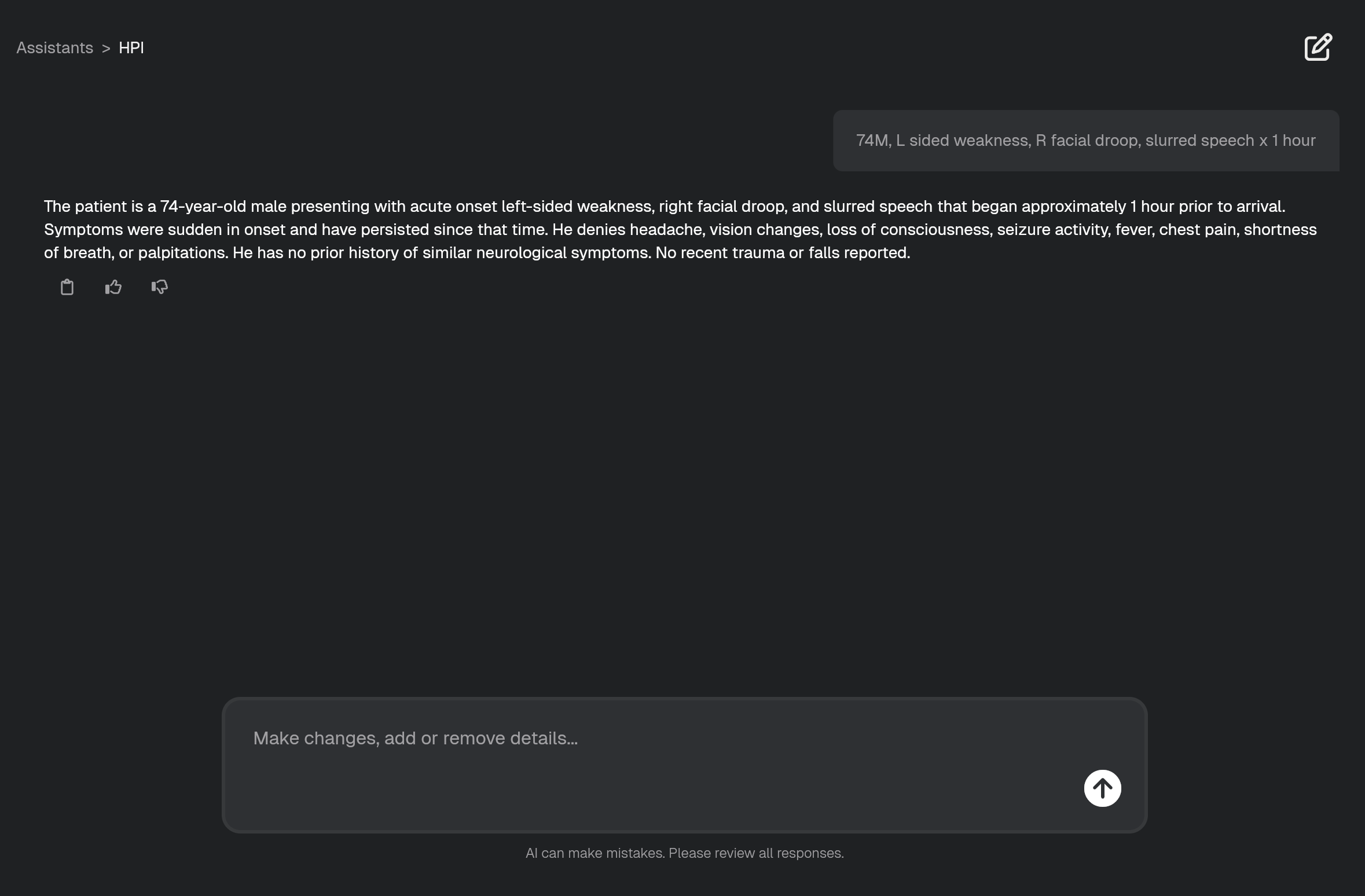
The screenshot demonstrates how a simple input like 74M, L sided weakness, R facial droop, slurred speech x 1 hour becomes a comprehensive, clinically appropriate HPI. The output provides a detailed symptom description using appropriate medical terminology, a clearly documented timeline and onset, pertinent negatives relevant to the presentation, and clinical context to support medical decision-making.
Flexible Follow-up and Refinement
Real-Time Modifications
After generating an HPI, easily refine the output with natural language commands:
Smart Updates
The assistant understands context and integrates new information without requiring you to regenerate the entire history.
Add clinical details:
Include that he's on warfarinAdd that family witnessed the eventNote he has a history of MI
Adjust focus and length:
Make this shorter for a fast track patientExpand the timeline sectionFocus more on the pain characteristics
Format modifications:
Format as bullet pointsUse our department's HPI templateAdd more pertinent negatives
Customize the Output
Customize palmER to match your preferred format by using Documentation Preferences:
Format using this structure:
- Chief Complaint:
- History of Present Illness:
- Review of Systems:
- Past Medical History (relevant):
- Medications (relevant):
Key Benefits
Speed and Efficiency
Generate comprehensive histories in seconds rather than minutes, with output formatted and ready to paste directly into your EMR.
Clinical Quality
You capture all essential history elements without having to think about what you might have missed. The assistant automatically includes pertinent positives and negatives, uses appropriate medical terminology that supports clinical decision-making, and structures the history in a way that's defensible and anchors your diagnostic reasoning.
Every HPI follows a consistent, standardized structure that your entire team can rely on. This consistency makes your documentation thorough and organized and improves clinical communication. And it serves as a great teaching tool, giving residents and students a consistent reference for proper HPI structure and content.
Workflow Integration
The HPI Assistant is designed to fit right into your workflow. It works with any EMR, and you can use Documentation Preferences to customize the output to match your preferred format and style. Paste the generated HPI directly into your EMR or use it as input for other palmER tools. Modify it as your case evolves. It's also great for creating clear sign-out summaries.
Integration with Other palmER Tools
The Workflow
- 01
Start with HPI Assistant
Generate the HPI from your brief clinical input.
- 02
Use Physical Exam Assistant
Paste in the HPI and note any abnormal exam findings.
- 03
Complete with MDM Assistant
Paste in your entire chart once everything's resulted to wrap up with the MDM.
Pro Tips for Optimal Results
Input Best Practices
- Include timing -
x 2 hoursvsrecentlyprovides better context - Add severity -
severevsmoderatehelps with urgency assessment - Note progression -
worseningvsstablevsimproving - Include triggers -
after exerciseorat restadds diagnostic value - Mention location -
left-sidedvsbilateralguides examination
Common Input Examples by Chief Complaint
Chest Pain:
55M, substernal chest pain x 30 min, diaphoretic, radiates to left armShortness of Breath:
68F, SOB and productive cough x 3 days, worsening, unable to walk upstairsAbdominal Pain:
23F, RLQ pain x 6 hours, sharp, worse with movement, nauseaHeadache:
34M, sudden severe headache x 1 hour, worst of life, photophobiaReady to Try It?
Sign up for a free trial and experience the HPI Assistant in action. Start Now